


🔒 Always double-check security and privacy implications.
⚙️ Use tools, software, and methods at your own discretion.
Using ChatGPT for personal routines might sound a bit futuristic, but it’s actually one of the simplest ways to reclaim hours in your day. Whether you’re figuring out what to tackle first thing in the morning or winding down at night, this AI tool can help you stay organized, focused, and less overwhelmed. We’re going to walk through real ways people are using ChatGPT to structure their days, from sunrise to bedtime.
Think of ChatGPT as a personal assistant that never sleeps and doesn’t judge you for asking the same question twice. It can draft your to-do lists, suggest time blocks for deep work, remind you to take breaks, and even help you plan tomorrow before your head hits the pillow. Let’s explore how this works in practice.
- Why AI Makes Sense for Daily Routines
- Morning Routines: Start Your Day with Clarity
- Midday Management: Stay on Track
- Afternoon Energy Slumps: Get a Productivity Boost
- Evening Wind-Down: Plan Tomorrow, Not Tonight
- Comparing Traditional Planning vs. ChatGPT-Assisted Planning
- Planning Methods Comparison
- Advanced Tips: Automate Repetitive Tasks
- Practical Examples: Real People, Real Results
- Common Pitfalls and How to Avoid Them
- Building Consistency Without Burnout
- Getting Started: Your First Steps
- My Experience & Insights
- AI Prompt Generator
- Frequently Asked Questions
Why AI Makes Sense for Daily Routines
Life moves fast, and it’s easy to feel like you’re always playing catch-up. That’s where AI steps in. Research from MIT found that professionals using ChatGPT for writing tasks saved an average of 10 minutes per document and improved quality at the same time. Shakked Noy, an Economics PhD student at MIT who co-authored the study, showed that workers completed tasks in 17 minutes with ChatGPT versus 27 minutes without it—a 59% productivity boost.
The key isn’t replacing your brain with AI. It’s about offloading the boring, repetitive stuff so you can focus on what actually matters. ChatGPT handles the grunt work—like sorting tasks by priority or drafting emails—while you save your energy for creative thinking and problem-solving.
Morning Routines: Start Your Day with Clarity

Your morning sets the tone for everything that follows. Instead of staring at a blank page wondering what to do first, you can ask ChatGPT to build a personalized morning schedule based on your goals and available time.
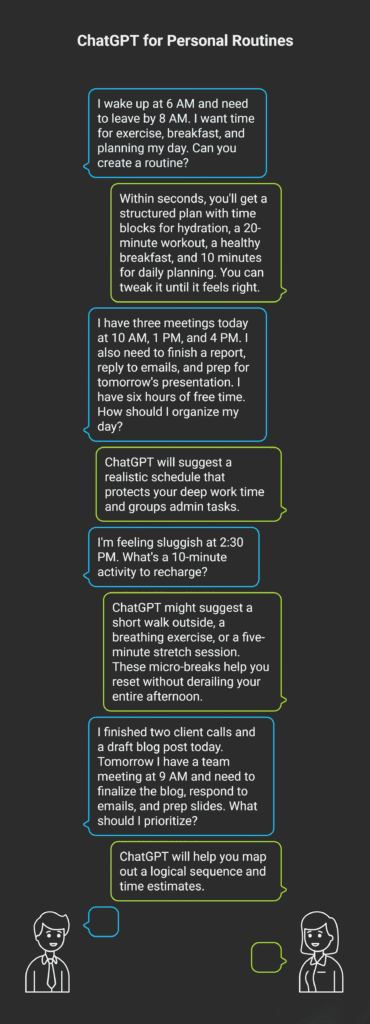
For example, tell ChatGPT: “I wake up at 6 AM and need to leave by 8 AM. I want time for exercise, breakfast, and planning my day. Can you create a routine?” Within seconds, you’ll get a structured plan with time blocks for hydration, a 20-minute workout, a healthy breakfast, and 10 minutes for daily planning. You can tweak it until it feels right.
Dave Crenshaw, a productivity expert and LinkedIn Learning instructor, emphasizes that starting with intentional planning reduces decision fatigue and sets you up for success. ChatGPT makes that planning process almost instant.
Midday Management: Stay on Track
By midmorning, distractions start creeping in. Emails pile up, Slack messages ping, and suddenly it’s noon and you haven’t tackled your main priorities. ChatGPT can help you time-block your workday and batch similar tasks together to minimize context switching.
Try this prompt: “I have three meetings today at 10 AM, 1 PM, and 4 PM. I also need to finish a report, reply to emails, and prep for tomorrow’s presentation. I have six hours of free time. How should I organize my day?” ChatGPT will suggest a realistic schedule that protects your deep work time and groups admin tasks.
Time blocking isn’t just a trendy buzzword. Cal Newport, a computer science professor at Georgetown University and author of Deep Work, argues that deliberately controlling your schedule reduces stress and increases meaningful output. ChatGPT acts as your time-blocking assistant, doing the heavy lifting for you.
Afternoon Energy Slumps: Get a Productivity Boost
Around 2 or 3 PM, energy dips are real. Instead of reaching for your third coffee, use ChatGPT to restructure your remaining tasks or suggest a quick break routine. You might ask: “I’m feeling sluggish at 2:30 PM. What’s a 10-minute activity to recharge?”
ChatGPT might suggest a short walk outside, a breathing exercise, or a five-minute stretch session. These micro-breaks help you reset without derailing your entire afternoon. You can also use it to prioritize what’s left on your list using frameworks like the Eisenhower Matrix (urgent vs. important).
Evening Wind-Down: Plan Tomorrow, Not Tonight
One of the smartest ways to use ChatGPT is at the end of your day. Spend five minutes asking it to help you review what you accomplished and plan tomorrow’s top three priorities. This simple habit clears your mind and prevents the Sunday scaries from hitting every night.
Prompt example: “I finished two client calls and a draft blog post today. Tomorrow I have a team meeting at 9 AM and need to finalize the blog, respond to emails, and prep slides. What should I prioritize?” ChatGPT will help you map out a logical sequence and time estimates.
Planning the night before reduces morning decision fatigue and lets you hit the ground running. It’s like giving your future self a head start.
Comparing Traditional Planning vs. ChatGPT-Assisted Planning
Planning Methods Comparison
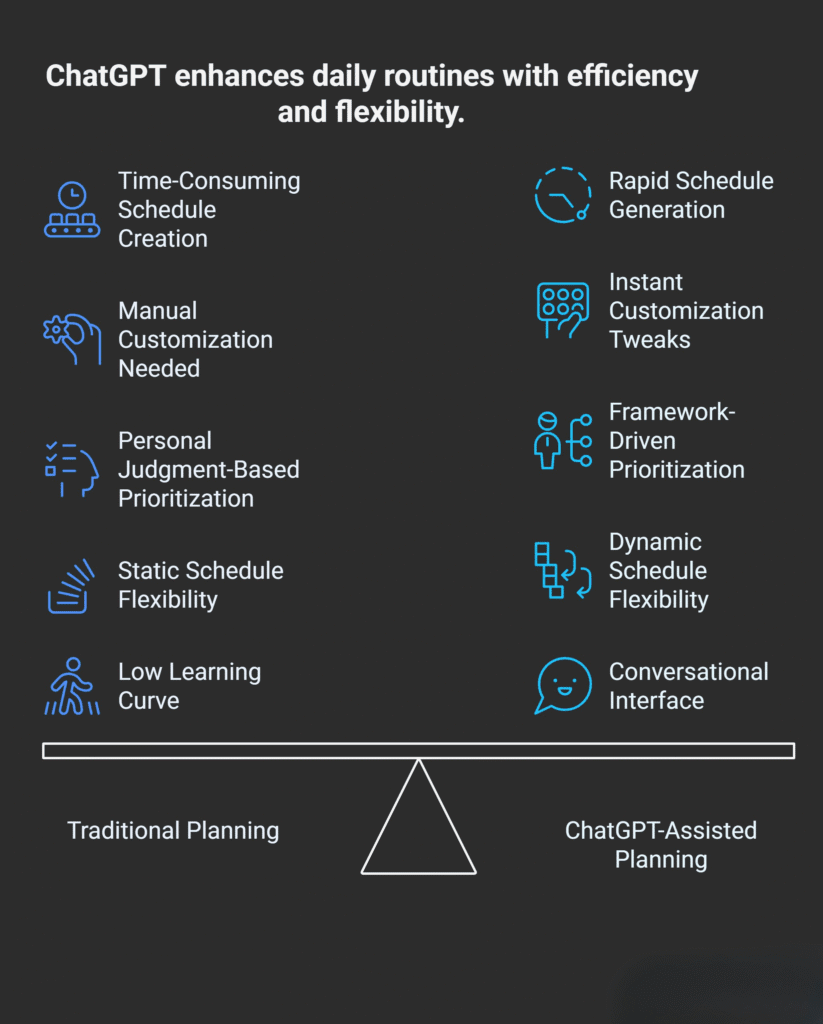
| Aspect | Traditional Planning | ChatGPT-Assisted Planning |
|---|---|---|
| Time to create a schedule | 10–15 minutes | 1–2 minutes |
| Customization | Manual adjustments needed | Instant tweaks with new prompts |
| Task prioritization | Relies on personal judgment | Can apply proven frameworks (Eisenhower, ABCDE) |
| Flexibility | Static once written | Dynamic, adapts to changes in real time |
| Learning curve | Low | Low, conversational interface |
Advanced Tips: Automate Repetitive Tasks
Beyond daily planning, ChatGPT can handle recurring chores through scheduled tasks. Imagine getting a daily news summary every morning at 7 AM or a weekly review prompt every Sunday night. OpenAI’s Scheduled Tasks feature lets you set these up with simple commands like “Give me a briefing on productivity news every afternoon.”
This kind of automation saves small chunks of time that add up fast. A UK government study found that civil servants using AI assistants for drafting, email management, and scheduling saved an average of 26 minutes per day. Over a month, that’s nearly nine hours back in your pocket.
You don’t need to be a tech wizard to make this work. Start small—maybe automate one annoying task, like generating a weekly meal plan or setting reminders for habit tracking. Then scale up as you get comfortable.
Practical Examples: Real People, Real Results
Let’s look at how folks are actually using ChatGPT day-to-day. One marketer uses it to draft morning email templates, saving 15 minutes before breakfast. A grant writer asks ChatGPT to outline project proposals, cutting brainstorming time in half. A data analyst uses it to generate daily task lists organized by priority and energy level.
These aren’t hypothetical scenarios. The MIT study mentioned earlier involved 444 experienced professionals across multiple fields, and the productivity gains were consistent across the board. Quality improved, too—evaluators rated ChatGPT-assisted work higher than work done without AI support.
The takeaway? ChatGPT isn’t just for coders or writers. It’s for anyone who wants to streamline their routine and get more done without burning out.
Common Pitfalls and How to Avoid Them
Even with a tool as helpful as ChatGPT, there are a few traps to watch out for. First, don’t over-automate. If you schedule every minute of your day, you’ll feel like a robot instead of a person. Leave buffer time for the unexpected.
Second, ChatGPT is a tool, not a magic wand. It won’t do the work for you—it just makes starting easier. You still have to show up and execute. Third, be specific with your prompts. Vague requests like “help me be productive” won’t get you far. Instead, try “create a 90-minute morning routine for someone who works from home, exercises, and needs 30 minutes of planning time.”
Finally, monitor and tweak your systems regularly. What works in January might need adjustments by March as your priorities shift. Treat your routines like living documents, not set-in-stone rules.
Building Consistency Without Burnout
The secret to making ChatGPT work for you long-term is keeping things simple. Cal Newport’s concept of “slow productivity” argues for doing fewer things concurrently, working at a natural pace, and obsessing over quality instead of speed. ChatGPT fits perfectly into this philosophy by handling the busy work so you can focus on fewer, more meaningful tasks.
Newport also recommends seasonal rhythms—like having slower summers and busier fall semesters. You can program ChatGPT to adapt your routines for different seasons or life phases. During a crunch week, ask for an intense schedule with deep work blocks. During a recovery week, request lighter days with more breaks.
Consistency doesn’t mean rigidity. It means showing up regularly with systems that adapt to your reality.
Getting Started: Your First Steps
Ready to try this yourself? Start by picking one part of your day—morning, midday, or evening. Open ChatGPT and describe your current routine and one pain point you’d like to fix. For example: “I wake up at 7 AM and feel rushed every morning. I need a routine that includes breakfast, exercise, and planning. I have 90 minutes before work.”
Review the suggested routine and test it for a few days. Tweak as needed. Once that’s dialed in, move to another part of your day. The goal isn’t perfection—it’s progress.
You can also explore scheduled tasks for recurring needs like weekly reviews, daily news digests, or habit reminders. These little automations compound over time, freeing up mental space and reducing decision fatigue.
AI tools like ChatGPT aren’t here to replace your judgment or turn you into a productivity machine. They’re here to give you more control over your time, reduce the friction of daily planning, and help you focus on what you actually care about. From morning routines to evening wind-downs, there’s a practical use case for almost every part of your day.
Whether you’re managing a packed work schedule, juggling family responsibilities, or just trying to find 10 extra minutes in your day, ChatGPT can help you build routines that stick. Start small, stay consistent, and watch how those little wins add up over time.
My Experience & Insights
While researching how people actually use ChatGPT for daily routines, I kept running into the same problem: most folks struggle with writing effective prompts. They’d tell ChatGPT something vague like “help me plan my day,” and they’d get generic advice that didn’t fit their life. That gap between what people needed and what they were getting got me thinking.
So I built a small web tool—an AI Prompt Generator—that takes the guesswork out of creating personalized ChatGPT prompts for daily planning. You tell it your planning goal (morning routine, work schedule, evening wind-down), choose your preferred tone (professional, casual, motivational), pick your detail level, and select the format you need. In seconds, it spits out three tailored ChatGPT prompts you can copy and paste directly. No more staring at a blank chat window wondering how to phrase your question.
What surprised me during development was how much specificity matters. According to OpenAI’s official prompt engineering best practices, being clear and specific is the number one rule for getting useful AI responses. The difference between “plan my morning” and “create a 90-minute morning routine for a remote worker who wants 20 minutes of exercise, healthy breakfast prep, and 15 minutes of daily planning” is night and day. The second prompt gives ChatGPT exactly what it needs to build something you’ll actually use.
I also came across a fascinating 2025 study on AI-driven activity planning published in IRJMETS that confirmed what I’d been seeing: AI-based planners significantly improve task management and scheduling efficiency compared to traditional methods. The research showed that AI excels at handling dynamic schedules where real-time adjustments are needed—exactly the kind of messy, unpredictable days most of us actually live. Users in the study reported reduced cognitive load and better time management, which mirrors the feedback I’ve gotten from people using structured prompts.
One thing I learned the hard way: don’t over-engineer your prompts. I initially tried building super-detailed, paragraph-long prompts with every possible variable. They worked, but they were exhausting to customize. Simpler is better. As Lakera’s 2025 prompt engineering guide points out, modern AI like ChatGPT with memory can store your preferences across sessions, so you don’t need to restate everything every time. Once ChatGPT learns your work style, goals, and constraints, follow-up prompts can be much shorter.
The tool I created gives you three variations because prompting is iterative. Your first try might not nail it, and that’s normal. Coursera’s 2025 ChatGPT prompting guide emphasizes that refinement is part of the process—start with an initial prompt, review the response, then tweak. Having three ready-made options lets you test different angles without starting from scratch each time.
If you’re new to using ChatGPT for routines, start with one part of your day and use a structured prompt. Test it for a few days, adjust what doesn’t fit, then move to the next piece. The AI Prompt Generator I built takes about 30 seconds to use and eliminates the “I don’t know what to ask” barrier that stops most people from even trying. Once you have a solid prompt template, ChatGPT becomes less like a confusing tool and more like a reliable planning partner.
AI Prompt Generator
Create customized ChatGPT prompts for your specific daily planning needs
Your Customized Prompts
Frequently Asked Questions
Can ChatGPT really create a personalized morning routine for me?
Yes, ChatGPT can build a fully personalized morning routine based on your wake-up time, goals, and preferences. The key is being specific in your prompt. Instead of asking “make me a morning routine,” try something like: “I wake up at 6 AM and need to leave by 8 AM. I want 20 minutes of exercise, a healthy breakfast, and 10 minutes for daily planning. Create a routine.” The more details you provide about your constraints and preferences, the more tailored the schedule will be. ChatGPT can factor in whether you’re a busy parent, remote worker, or student, and adjust accordingly.
How do I write effective prompts for daily planning?
The best prompts include four elements: your time constraints, specific tasks, preferred structure, and any special needs. For example: “I have six hours of work time today with meetings at 10 AM, 1 PM, and 4 PM. I need to finish a report, reply to emails, and prep a presentation. How should I organize my day?” OpenAI’s prompt engineering guide emphasizes clarity and specificity as the foundation of good prompts. Avoid vague requests like “help me be productive”—ChatGPT can’t read your mind. Instead, describe your actual situation with real times, tasks, and goals.
Is ChatGPT free to use for routine planning, or do I need a paid account?
The free version of ChatGPT works perfectly fine for basic routine planning, schedule creation, and daily task organization. You can create schedules, prioritize tasks, and get planning advice without paying anything. The paid ChatGPT Plus or Pro accounts ($20-$200/month) offer faster responses, access to newer models like GPT-5, and features like scheduled tasks that run automatically. For most people starting out, the free version is more than enough to build morning routines, time-block your day, and plan tomorrow’s priorities. Upgrade only if you want advanced automation or need faster performance during peak hours.
Can ChatGPT help me stick to my routine, or does it just create plans?
ChatGPT excels at creating plans, but sticking to them is still on you. However, it can help with accountability in creative ways. You can ask it to generate daily check-in prompts like “Review what I accomplished today and suggest adjustments for tomorrow,” or set up recurring reminders using scheduled tasks. Some users ask ChatGPT to act as an accountability partner: “I planned to exercise this morning but skipped it. Help me troubleshoot why and adjust my routine.” The AI won’t nag you like a human coach, but it can help you reflect, adjust, and restart when routines fall apart.
What’s the difference between using ChatGPT and a traditional planner app?
Traditional planner apps (Google Calendar, Notion, Todoist) are great for executing a plan—they store tasks, send reminders, and track progress. ChatGPT is better for creating and refining the plan itself. It’s like having a brainstorming partner who helps you figure out what to do and when, based on your unique situation. You can describe your messy day in plain English, and ChatGPT will suggest a realistic schedule. Then you copy that schedule into your planner app. Many people use both: ChatGPT for planning, calendar apps for execution. The combination works better than either tool alone.
Can ChatGPT adjust my routine if my day gets disrupted?
Absolutely. One of ChatGPT’s biggest strengths is real-time adjustments. If your 10 AM meeting gets moved to 2 PM, just tell ChatGPT: “My meeting shifted from 10 AM to 2 PM. I still need to finish a report and reply to emails. How should I restructure my afternoon?” It’ll instantly reorganize your remaining tasks. This dynamic flexibility is where AI shines compared to static planners. Life is messy, and ChatGPT adapts as fast as you can type. You can also ask it to build buffer time into schedules: “Create a daily plan with 15-minute buffers between tasks to handle interruptions.” That way, your routine has built-in breathing room.
🔒 Always double-check security and privacy implications.
⚙️ Use tools, software, and methods at your own discretion.