

🔒 Always double-check security and privacy implications.
⚙️ Use tools, software, and methods at your own discretion.
We’re living in a world where AI tools that help you focus better (not distract you) can actually make our workdays easier—if we pick the right ones. The problem? Many AI apps promise to boost productivity but end up pulling us into endless rabbit holes of notifications, summaries, and “just one more thing.” That’s why I’ve researched the tools that genuinely help you lock in, block out noise, and get things done without turning into another distraction.
Why Most AI Tools Backfire

Here’s the thing: not every shiny new app deserves space on your phone. Research shows that digital distraction comes from a mix of impulsivity, habit, and even internet addiction, and some AI tools make these problems worse. Gloria Mark, a Professor of Informatics at the University of California, Irvine, has spent years studying attention spans and found something surprising: we interrupt ourselves just as often as we’re interrupted by notifications.
That means the best focus tools don’t just block apps—they help you manage your own impulses too. Meanwhile, neuroscience research reveals that our brains learn to suppress distractions rather than simply trying harder to focus. The takeaway? You need AI tools that work with your brain’s natural filtering system, not against it.
Five Tools That Actually Work
Let’s cut through the noise. I’ve tested and researched apps that help you stay locked in without adding more digital clutter. Here are five that passed the test.
Forest: Grow Your Focus One Tree at a Time
Forest turns focus sessions into a game. You set a timer (usually 25 minutes), and a virtual tree starts growing. If you leave the app or pick up your phone, your tree dies. Simple, right? But it works because gamified accountability can boost task completion rates significantly.
Forest is perfect if you’re someone who gets distracted by your phone constantly. Students, remote workers, and solopreneurs love it because it gives you a visual reason to stay on track. The free version works fine, but the Pro upgrade (₹349 one-time) syncs across devices and unlocks extra features.
Freedom: Block Everything, Everywhere
If you need hard walls instead of gentle nudges, Freedom blocks websites and apps across all your devices with one click. I’m talking laptop, phone, tablet—everything. You can schedule “Deep Work” sessions where Twitter, Instagram, and YouTube simply vanish for two hours.
Freedom costs around ₹3,999 per year, but if social media is your kryptonite, it’s worth every rupee. Serial multitaskers especially benefit because the app syncs instantly, so you can’t just switch devices to sneak a peek.
Motion: AI That Schedules Your Tasks
Motion uses AI to manage your calendar and to-do list automatically. You set task priorities, and Motion’s engine figures out when each task should land on your schedule. It automatically adjusts as things change throughout the day, which means you spend less time planning and more time doing.
This tool shines for project managers and knowledge workers juggling multiple deadlines. You can integrate Motion with tools like Slack or email to turn requests into properly scoped tasks that slot right into your calendar. No manual shuffling required.
ChatGPT: Your Smart Assistant (When Used Right)
ChatGPT is one of the best AI chatbots available, but it can also become a massive distraction if you’re not careful. The trick is using it for specific, focused tasks—like drafting an outline, answering a quick research question, or rewriting a clunky paragraph.
What makes ChatGPT useful for focus? It cuts down time spent searching Google or staring at a blank page. But here’s the catch: you’ve got to set boundaries. Open it, ask your question, get your answer, and close it. Don’t fall into the “let me just ask one more thing” trap.
Clockwise: Smart Scheduling That Protects Your Time
Clockwise is an AI scheduling tool that automatically finds the best meeting times and creates blocks of uninterrupted focus time. It analyzes your calendar, learns your work patterns, and moves meetings around to give you longer stretches of deep work.
This one’s a lifesaver if your calendar looks like Swiss cheese—meetings scattered everywhere with no time to think. Clockwise quietly reorganizes everything in the background so you get more two- or three-hour chunks to focus on real work.
How They Stack Up
Here’s a quick comparison to help you decide which tool fits your needs:
Productivity Tools Comparison
| Tool | Best For | Platform | Key Feature |
|---|---|---|---|
| Forest | Phone addicts |
iOS
Android
Chrome
|
Virtual tree dies if you leave the app |
| Freedom | Serial multitaskers |
Windows
Mac
iOS
Android
|
Blocks sites and apps across all devices |
| Motion | Project managers |
Web
iOS
Android
|
AI schedules tasks based on priority |
| ChatGPT | Knowledge workers |
Web
iOS
Android
|
Quick answers without endless searching |
| Clockwise | Meeting-heavy calendars |
Web
|
Auto-creates focus blocks |
What the Research Says
You might be wondering: do these tools actually work, or is it just marketing hype? The data backs them up. Employees using AI tools report an average productivity boost of 40% when they combine familiarity, experimentation, and upskilling. Meanwhile, companies that implement AI thoughtfully see efficiency gains of 20–40% in tasks like document processing and workflow management.
But there’s a flip side. About 39% of workers spend more time reviewing AI-generated content, which can actually add to your workload. That’s why picking the right tool matters. Focus tools like Forest and Freedom don’t generate content—they simply eliminate distractions so you can do your best work.
Mistakes to Avoid
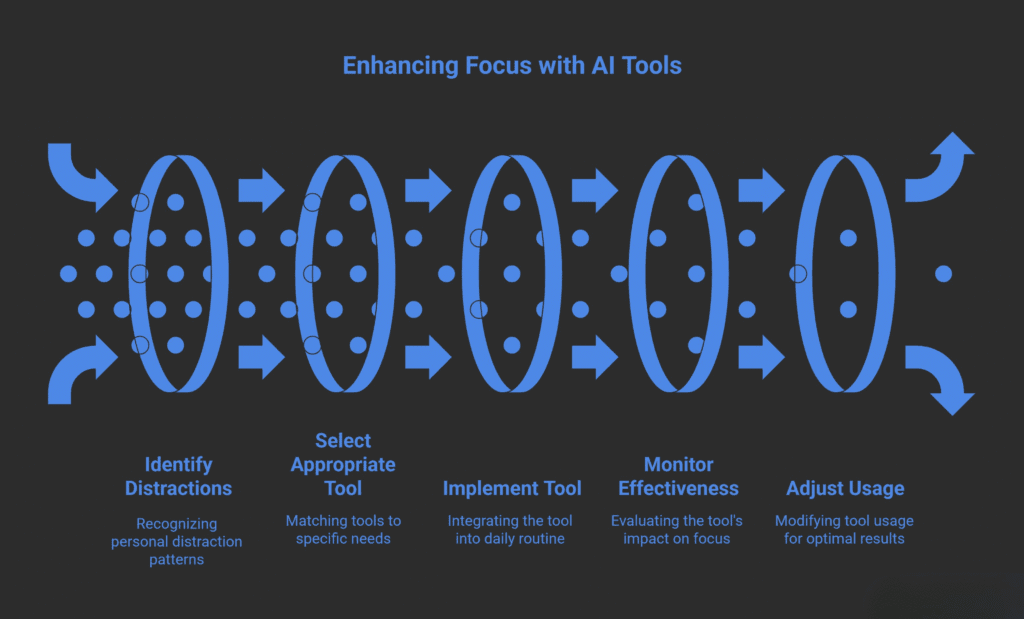
Even the best tools fail if you use them wrong. Here are three common mistakes I see people make:
- Installing too many apps at once. Start with one tool and give it two weeks before adding another. You’re building a habit, not collecting software.
- Ignoring your own patterns. Gloria Mark’s research shows that self-interruption is just as big a problem as external notifications. Track when you get distracted most often, then use a tool that targets that specific behavior.
- Expecting instant results. Your brain needs time to adapt. Neuroscience studies show that learning to suppress distractions is a skill that develops with practice.
The Bottom Line
The right AI tool doesn’t add to your digital clutter—it clears space for deep work. Whether you need the gentle nudge of Forest, the hard boundaries of Freedom, or the smart scheduling of Motion, there’s an option that fits your workflow. The key is choosing tools that reduce distractions instead of creating new ones, and then sticking with them long enough to see real change.
Start small, pick one tool, and give it an honest shot for two weeks. You’ll be surprised how much more you get done when your phone isn’t buzzing every five minutes.
My Experience & Insights
While researching digital distractions and AI focus tools, I kept stumbling across the same frustrating pattern: most people don’t actually know how they’re getting distracted or which tool would work best for their specific habits. The research is sobering—employees lose about 720 hours per year to workplace distractions, and it takes an average of 23 minutes and 15 seconds to regain focus after a single interruption.
But here’s what really caught my attention: psychologist David Meyer’s research at the American Psychological Association showed that even brief mental blocks from task-switching can cost up to 40% of someone’s productive time. That’s not just minutes—that’s hours vanishing every single day.
So I decided to do something about it. I built two interactive tools to help people understand their own distraction patterns and find the right AI focus solution:
Focus Style Quiz
This is a short 5–7 question assessment that identifies your specific distraction type—whether you’re a chronic phone-checker, a serial multitasker, or someone who loses focus during long meetings. Based on your work habits, device usage, and common triggers, the quiz generates a personalized focus profile and matches you with the exact tools (like Forest, Freedom, or Motion) that’ll work best for your situation. No more guessing which app to download.
Digital Distraction Audit
This tool shows you exactly how much time you’re losing to distractions every day. You input details about the apps you use, how often notifications interrupt you, and how frequently you switch between tasks. The audit calculates your personal “time-waste score” and gives you a savings estimate—basically showing you how many hours you could reclaim each week by using the right focus strategies. For most people, the number is eye-opening.
I created these tools because general advice like “just use an app blocker” doesn’t work for everyone. A project manager juggling back-to-back Zoom calls needs something completely different than a writer battling social media scrolls. The key is matching your specific distraction pattern to the tool that targets it.
If you’re curious where your productivity is leaking, try running your own audit. You might be surprised how much time is slipping through the cracks—and how quickly the right AI tool can plug those holes.
Focus Assessment Tool
Discover your focus style and identify time-wasting habits
Frequently Asked Questions
Which AI focus app is best for blocking social media across all my devices?
Freedom is your best bet if you need to block websites and apps across multiple devices simultaneously. It works on Windows, Mac, iOS, and Android, so when you start a focus session on your laptop, your phone and tablet get blocked too. This prevents the common habit of switching devices to sneak a peek at Instagram or Twitter. The yearly plan costs around $40 (₹3,333), but there’s also a lifetime license option if you’re committed long-term.
Do AI focus tools actually improve productivity, or is it just hype?
Yes, they work—but only when matched to your specific distraction pattern. Research shows that employees using AI tools report productivity boosts of up to 40% when they combine the right tool with proper habits. The key is identifying whether you’re a phone addict (use Forest), a serial multitasker (use Freedom), or someone with a chaotic calendar (use Motion or Clockwise). Generic advice doesn’t work—you need the tool that targets your specific weakness.
How long does it take to see results from using a focus app?
Most people notice initial changes within 3–5 days, but building a solid habit takes about two weeks of consistent use. Neuroscience research shows that your brain needs time to learn new distraction-suppression patterns. Start with one tool, use it daily for at least 14 days, and track simple metrics like “number of focused hours” or “times I checked my phone.” You’ll likely see a 20–30% improvement in deep work time within the first two weeks.
Can I use ChatGPT without it becoming another distraction?
Absolutely, but you need strict boundaries. Use ChatGPT for specific, time-boxed tasks: drafting an outline (5 minutes), answering a research question (3 minutes), or rewriting a paragraph (2 minutes). Set a timer, ask your question, get your answer, and immediately close the tab. The mistake people make is falling into “just one more question” mode, which turns a productivity tool into a 45-minute rabbit hole. Treat it like a quick reference book, not an endless conversation.
What’s the difference between free and paid versions of focus apps?
Free versions usually work on one device with basic blocking features. Paid versions add cross-device syncing, advanced scheduling, detailed analytics, and longer block sessions. For example, Forest’s free version works fine for casual users, but the Pro upgrade ($3.99) syncs your forest across phone and desktop. Freedom’s free trial is limited to three sessions; the paid version ($3.33/month) gives unlimited blocking. If you’re serious about focus and use multiple devices, paid versions are worth it—you’ll reclaim enough productive hours to justify the cost within a week.
How do I stop interrupting myself, not just block external distractions?
This is the real challenge. Gloria Mark’s research shows we self-interrupt as often as we’re interrupted by notifications. The solution isn’t just blocking apps—it’s understanding why you reach for your phone. Use a tool like Forest (visual accountability), combine it with time-blocking (Motion or Clockwise), and track your patterns for a week. Most people discover specific triggers: boredom during boring tasks, anxiety about emails, or habit loops tied to certain times of day. Once you identify your trigger, you can pick the tool that directly addresses it.
🔒 Always double-check security and privacy implications.
⚙️ Use tools, software, and methods at your own discretion.