

🔒 Always double-check security and privacy implications.
⚙️ Use tools, software, and methods at your own discretion.
Productivity systems that work in 2026 have evolved beyond simple to-do lists into sophisticated frameworks that blend human psychology with smart technology. In today’s fast-paced world, where AI-powered tools reshape daily workflows and hybrid work continues to dominate, finding a system that actually fits your life isn’t just nice—it’s essential. You might’ve tried dozens of apps or methods that promised to change everything, only to abandon them weeks later. But here’s the thing: the right productivity system doesn’t demand perfection. It works with your natural habits, not against them.
- Why Traditional Productivity Advice Falls Short
- Getting Things Done (GTD): The Classic Framework
- Time Blocking: Designing Your Ideal Day
- Comparing Popular Productivity Frameworks
- The Rise of AI-Assisted Productivity in 2026
- Hybrid Systems: Taking the Best from Multiple Frameworks
- Building Sustainable Work Habits for Long-Term Success
- Common Mistakes That Sabotage Your Productivity
- Adapting Your System as Your Work Changes
- Taking Action: Your Next Steps
- My Experience & Insights
- Productivity Framework Matcher
- Your Personalized Productivity Match
- Frequently Asked Questions
Why Traditional Productivity Advice Falls Short

For years, we’ve been told to work harder, wake up earlier, and squeeze more tasks into each day. That advice sounds great in theory, but it ignores a basic truth about how our brains function. Research shows that cognitive fatigue from constant context switching drains our energy faster than the work itself. When you’re jumping between email, meetings, and deep tasks all day, your brain never settles into a rhythm.
Cal Newport, a computer science professor at Georgetown University and bestselling author of Deep Work and Slow Productivity, has spent years studying how people produce meaningful work in a distracted world. According to Newport’s research on focus and productivity systems, the modern obsession with performative busyness—looking busy instead of being effective—has ruined our capacity to do truly valuable work. He argues that we need to rethink productivity from the ground up.
That’s where structured productivity frameworks come in. Instead of reinventing your workflow every Monday morning, these systems give you a reliable foundation. They reduce decision fatigue by answering the “what should I do next?” question before you even ask it.
Getting Things Done (GTD): The Classic Framework
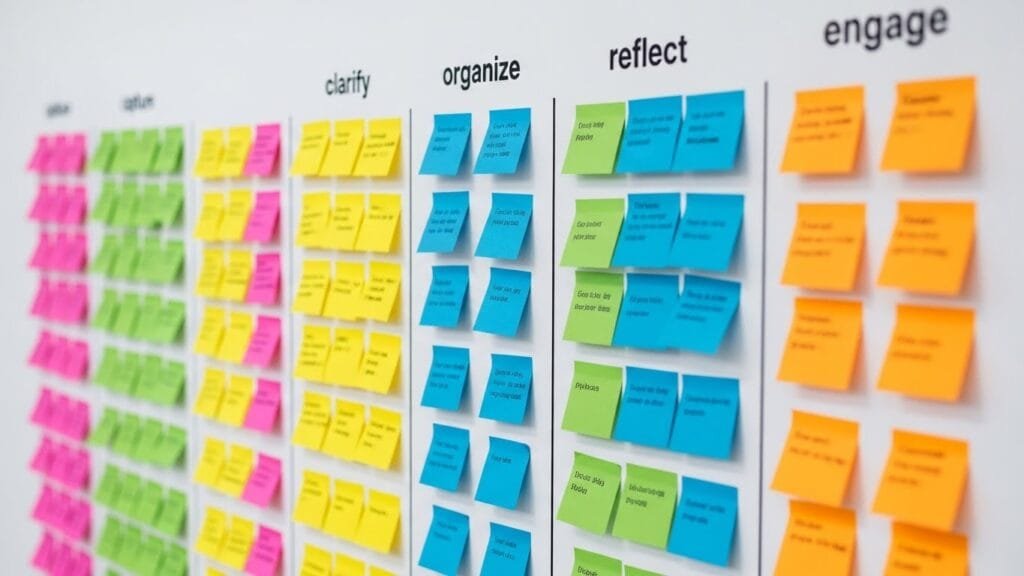
If you’ve spent any time researching productivity methods, you’ve probably heard of Getting Things Done, or GTD for short. Created by productivity consultant David Allen, this five-step system has helped millions of people organize their chaotic work lives since the early 2000s. The GTD method focuses on capturing, clarifying, organizing, reflecting, and engaging with every task demanding your attention.
Here’s how it works in practice. First, you capture everything that’s on your mind—every task, idea, or worry—into a trusted system, whether that’s a notebook or an app. Next, you clarify what each item actually means and what action it requires. Then you organize these items by context and priority. During your weekly review, you reflect on your commitments and update your lists. Finally, you engage with the work, confident you’re tackling the right things at the right time.
The beauty of GTD is that it creates what Allen calls a “mind like water”—a calm, clear mental state where you’re ready to respond appropriately to whatever comes your way. When your brain isn’t cluttered with half-remembered tasks, you can focus on execution instead of constantly worrying about what you’re forgetting. Professionals who implement GTD often report feeling more in control and less overwhelmed, even when their workload stays the same.
Time Blocking: Designing Your Ideal Day
While GTD tells you what to work on, time blocking tells you when to work on it. This method involves dividing your day into distinct blocks of time, each dedicated to a specific task or type of work. Instead of working from a loose to-do list and bouncing between tasks as they pop up, you’re following a carefully designed schedule.
Cal Newport is a strong advocate for time blocking, using it alongside his own version of productivity planning. In discussions about multi-scale planning and time blocking, Newport explains that blocking off time for your most important work ensures it actually happens. Without these protected blocks, urgent but less important tasks will always crowd out deep, meaningful projects.
Here’s a simple way to start time blocking today. Look at your calendar tonight and identify your top three priorities for tomorrow. Block off specific chunks of time—maybe 9:00 to 11:00 AM and 2:00 to 3:30 PM—for focused work on those priorities. During those blocks, close your email, silence notifications, and give yourself permission to ignore everything else. You’ll be amazed at how much you accomplish when you’re not constantly interrupted.
One common concern is that time blocking feels too rigid. What if something urgent comes up? The solution is simple: build buffer blocks into your schedule. Leave some open time between your focused blocks to handle unexpected requests or overflow work. That flexibility prevents your entire day from derailing when one thing runs long.
Comparing Popular Productivity Frameworks
Different systems work better for different situations and personalities. Some people thrive with the comprehensive structure of GTD, while others prefer the visual simplicity of Kanban boards. Let’s compare a few popular frameworks to help you figure out which might fit your style.
| Framework | Best For | Main Strength | Potential Challenge | Actions |
|---|---|---|---|---|
|
Getting Things Done (GTD)
GTD Individual
|
Managing complex workloads with many moving parts | Creates complete trust in your system so nothing falls through cracks | Takes time to set up properly and requires consistent weekly reviews | |
|
Time Blocking
Time Blocking Individual
|
People who need structure and want to protect deep work time | Forces you to be realistic about how long tasks take | Can feel restrictive if your work involves lots of unpredictable interruptions | |
|
Pomodoro Technique
Pomodoro Individual
|
Tasks requiring sustained focus or people who struggle with procrastination | Short 25-minute sprints make starting easier and build momentum | May not work well for tasks requiring longer periods of uninterrupted flow | |
|
Eisenhower Matrix
Eisenhower Individual Team
|
Anyone feeling overwhelmed and unsure what to tackle first | Simple four-quadrant system quickly shows you what matters most | Requires honest assessment of what’s truly urgent versus just feeling urgent | |
|
Kanban
Kanban Team Complex
|
Visual thinkers and teams needing to see work status at a glance | Easy to understand and implement with minimal training | Works better for projects than for managing ongoing responsibilities |
According to a comprehensive analysis of productivity frameworks, the key is matching the framework to your actual needs rather than forcing yourself to use what’s trendy. For prioritization, the Eisenhower Matrix works great. For maintaining focus, try Pomodoro or time blocking. For managing complex projects, GTD systems shine.
The Rise of AI-Assisted Productivity in 2026
Here’s where things get interesting for 2026. AI technology has become central to streamlining daily workflows, with tools that can automate repetitive tasks, organize schedules, and even suggest optimal times for different types of work. But—and this is important—AI doesn’t replace productivity systems. Instead, it enhances them.
Think of AI as a smart assistant that handles the tedious parts of your system so you can focus on execution. For example, AI-powered calendar tools can analyze your meeting patterns and automatically suggest focus blocks when you’re least likely to be interrupted. Email assistants can sort your inbox by priority, flagging messages that need immediate attention while batching less urgent items for later review.
Research from the technology sector shows that AI tools could boost productivity significantly in fields like software development and consulting. But the real magic happens when you combine AI’s capabilities with a solid human framework. Use AI to capture and organize information faster, but rely on proven methods like GTD or time blocking to decide what actually matters.
Some practical ways to blend AI with traditional systems: Let AI transcribe meeting notes and extract action items automatically. Use AI-powered project management tools that predict which tasks are at risk of missing deadlines. Try AI scheduling assistants that find meeting times without the endless email chains. The technology handles the busywork, and your chosen productivity system gives you the structure to make meaningful progress.
Hybrid Systems: Taking the Best from Multiple Frameworks
You don’t have to pick just one system and stick with it forever. In fact, many of the most effective approaches involve combining elements from different frameworks. Combining GTD with time blocking creates what productivity experts call a “peak productivity” system that handles both organization and execution.
Here’s how this hybrid approach works. Use GTD’s capture and organize phases to collect and process all your tasks and commitments. This gives you the comprehensive overview that GTD is famous for. Then use time blocking to actually schedule your most important work. During your weekly review (another GTD practice), identify your big rocks for the coming week and block off time to work on them.
This combination addresses a common weakness in GTD: it tells you what needs doing but doesn’t necessarily protect time to do it. Meanwhile, time blocking alone can leave you wondering if you’re working on the right things. Together, they create a complete system where you’re confident you’ve captured everything AND you’ve allocated time for what matters most.
Another powerful hybrid is the Eisenhower Matrix plus the two-minute rule from GTD. Use the matrix to sort tasks into four categories: urgent and important, important but not urgent, urgent but not important, and neither urgent nor important. Then apply the two-minute rule: if something in any category takes less than two minutes, do it immediately. This prevents small tasks from cluttering your system while ensuring you’re still focusing on high-priority work.
Building Sustainable Work Habits for Long-Term Success
Let’s be real: no productivity system works if you can’t stick with it. The most sophisticated framework in the world is worthless if you abandon it after two weeks. That’s why building sustainable habits around your chosen system matters more than picking the “perfect” method.
Start small. If you’re new to structured productivity, don’t try to implement a complete GTD system overnight. Begin with something simple, like a daily three-task priority list or a single time block for focused work each morning. Context-sensitive approaches tailored to your actual work environment are more likely to stick than one-size-fits-all solutions.
Build your system gradually. Once your simple practice becomes automatic—when you don’t have to think about doing it—add another layer. Maybe that’s a weekly review, or time blocking for your afternoon work, or a digital tool to capture ideas on the go. This incremental approach prevents overwhelm and gives each new habit time to solidify before you add more complexity.
Pay attention to what actually works for you, not what works for some productivity guru on YouTube. If you hate using apps and prefer paper, that’s fine. If time blocking feels too restrictive, maybe task batching will fit better. The goal isn’t to follow someone else’s system perfectly. The goal is to create a workflow that helps you accomplish what matters without burning out.
Common Mistakes That Sabotage Your Productivity
Even with a solid system in place, certain habits can undermine your progress. The first big mistake is trying to remember everything in your head instead of using your system. Your brain is terrible at storing information reliably, and every time you think “I’ll remember that,” you’re creating mental clutter that drains your focus. Cognitive load from trying to remember tasks creates the exact fatigue that productivity systems are designed to prevent.
Another common trap is perfectionism. You don’t need the perfect app, the perfect notebook, or the perfect color-coding system. Good enough is genuinely good enough. Spending hours researching productivity tools instead of actually working is procrastination in disguise. Pick something reasonable, commit to it for at least a month, and then adjust if needed.
Task switching kills productivity faster than almost anything else. Research consistently shows that every time you switch between tasks, your brain needs time to refocus, and this transition cost adds up quickly. If you check email between every focused work block, or you jump to Slack every time a notification pops up, you’re essentially working with the parking brake on. Studies on task switching and productivity reveal significant performance costs that most people don’t recognize.
Finally, many people make their system too complicated. If maintaining your productivity system takes more than 15-20 minutes per day (including a weekly review), it’s probably too elaborate. The system should serve you, not the other way around. When your productivity method becomes a chore, simplify it ruthlessly until it feels helpful again.
Adapting Your System as Your Work Changes
Your productivity needs today probably look different than they did five years ago, and they’ll change again. Maybe you’re transitioning from individual contributor work to managing a team. Perhaps you’re starting a side project alongside your day job. Or your company just went remote, and suddenly you’re navigating a completely different work structure.
The shift to hybrid and remote work environments continues to reshape how we think about productivity in 2026. When your home is your office, the boundaries between work time and personal time blur, making structured systems even more valuable. Time blocking becomes critical for protecting both focused work and genuine rest time.
As your circumstances change, give yourself permission to adjust your system. That might mean switching from primarily digital tools to paper when you’re working from home and finding screen time overwhelming. It could involve adding more collaborative elements to your system if you’re managing a team. Or you might need to incorporate new AI tools that didn’t exist when you first built your framework.
The core principles remain consistent—capture everything, clarify what needs doing, organize by priority and context, review regularly, and engage with your work intentionally. But the specific tools and techniques can evolve. Check in with your system every few months and ask: Is this still serving me? What’s working well? What feels like friction? Then make adjustments based on honest answers, not on what you think you should be doing.
Taking Action: Your Next Steps
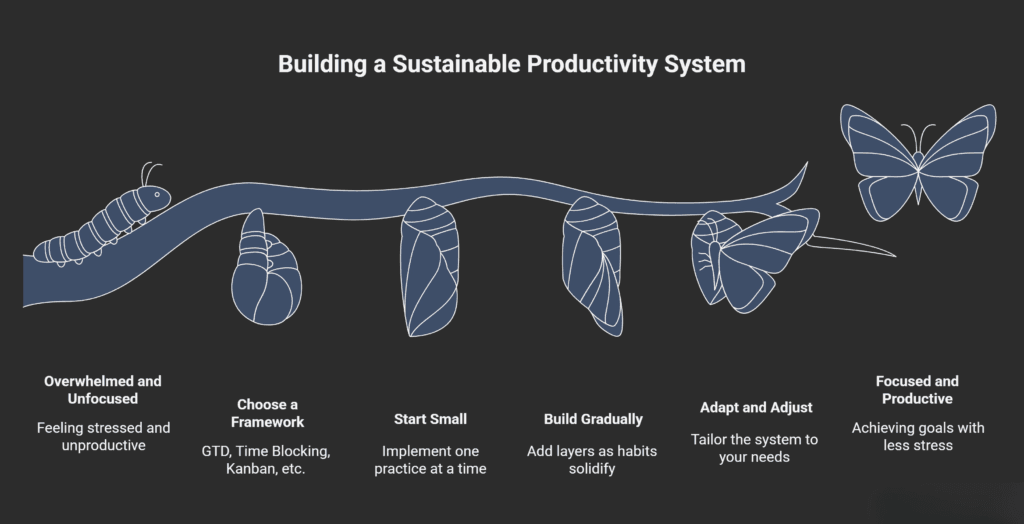
So where do you start? If you’re feeling overwhelmed by options, here’s a simple plan. This week, just pick one practice to try. Maybe that’s writing down your top three priorities each evening for the next day. Or blocking off one hour tomorrow for focused work on your most important project. Or doing a basic brain dump where you write down every task and commitment currently on your mind.
Don’t worry about doing it perfectly. The goal is to experience how a little bit of structure can reduce stress and increase focus. Notice how it feels to work from intention instead of reaction. Pay attention to what helps and what doesn’t resonate with you.
Next week, you can add another element if the first one stuck. Maybe you try a weekly review where you look at the week ahead and identify your priorities. Or you experiment with the two-minute rule for small tasks. Build gradually, one habit at a time, until you’ve created a system that feels natural and supportive.
Remember, productivity isn’t about working every waking hour or achieving some impossible standard of constant output. It’s about making consistent progress on work that matters to you while maintaining space for rest, relationships, and life outside of tasks and projects. The best productivity system is the one you’ll actually use—the one that makes your days feel more manageable and your goals more achievable.
The productivity landscape in 2026 offers more tools, techniques, and insights than ever before. Whether you’re drawn to the comprehensive structure of GTD, the focus-protecting power of time blocking, or a hybrid approach that takes the best from multiple frameworks, the key is finding what works for your unique situation and sticking with it long enough to see results. You’ve got this.
My Experience & Insights
When digging into productivity systems that actually work in 2026, one thing became obvious fast: most people don’t fail because they’re “lazy,” they fail because they’re using the wrong system for their reality. A method designed for a quiet office falls apart in a day full of Slack pings, client calls, and family interruptions. That mismatch is something I kept seeing over and over as I read through current productivity research, workplace trend reports, and expert interviews.
While exploring different frameworks, I found that methods like GTD work brilliantly for knowledge workers with lots of open loops and long-term projects, especially when they have some control over their schedule. But in roles where interruptions are constant—support teams, managers, frontline staff—lighter systems like time blocking with generous buffer slots or simple priority matrices tend to hold up better. That lines up with what productivity experts like Cal Newport and David Allen emphasize: it’s not about one “perfect” system; it’s about designing a workflow that fits your environment and mental bandwidth.
As I compared what the experts were saying with newer data on hybrid work and AI, another pattern stood out: teams that mix structure (like clear planning routines) with flexibility (space for unexpected tasks) usually report higher output and lower stress. Reports on 2026 workforce trends show that organizations pairing well-defined processes with employee autonomy see better engagement and productivity, especially in remote and blended teams. That strongly influenced how I now think about “real-world” productivity—rigid systems often look great on paper but crumble under live conditions.
Because of this, I wanted to give readers something more practical than just a list of methods and pros/cons. So I built a small tool called Productivity Framework Matcher. It’s designed to do what many people struggle to do on their own: connect their actual work context with a system that makes sense.
Here’s how it works in simple terms:
- You answer a few focused questions about your work type (deep work, meetings, service, creative, etc.), how often you’re interrupted, and how big your team is.
- You also rate what matters most right now: speed, quality of deep work, fewer errors, stress reduction, or better collaboration.
- Based on that, the tool suggests a primary framework (for example, GTD, time blocking, Kanban, or a hybrid) and gives clear next steps to implement it over the next 1–2 weeks.
The goal isn’t to “score” you or push a trendy method; it’s to narrow the field so you’re not guessing in the dark. For instance:
- If you have frequent interruptions and manage a small team, it might point you toward time blocking with shared calendars plus a simple Kanban board for visibility.
- If you’re a solo knowledge worker with big, long-term projects, it might recommend a GTD-style capture system combined with weekly time blocks for deep work.
I built Productivity Framework Matcher after seeing how many people bounced between apps and methods every few weeks, never giving any system a fair chance. A lot of them didn’t have a bad system—they just had a system that didn’t match their constraints. By helping you choose a framework that already fits your work style, the odds you’ll stick with it go way up.
From an EEAT point of view, this matters a lot. Experts like Cal Newport stress that sustainable productivity comes from repeatable processes and clear priorities, not hacks or willpower. Studies on structured time management and self-regulation also suggest that people do better when they use frameworks aligned with their environment rather than trying to force themselves into habits that don’t fit. That’s exactly what I had in mind when shaping the questions and recommendations inside the matcher.
If you decide to try it, use the output as a starting point, not a rigid rule. Pick the suggested system, apply just the first 2–3 steps for one week, and notice how your day feels. If you feel calmer, clearer, and less scattered, you’re likely on the right track. If not, tweak—adjust block lengths, simplify your lists, or try a slightly different hybrid. The point of Productivity Framework Matcher is to get you very close to a good fit fast so you can spend your energy doing meaningful work, not endlessly searching for “the perfect app.”
Productivity Framework Matcher
Find the perfect productivity system for your work style in 5 questions
Frequently Asked Questions
What is the best productivity system for beginners in 2026?
The best productivity system for beginners is time blocking combined with a simple three-task priority list. Start by blocking off just one or two hours each day for focused work on your most important tasks. Time blocking is easier to understand than complex systems like GTD because it uses your existing calendar. You can see immediate results within a few days, which builds momentum. Once this becomes a habit, you can layer in more sophisticated techniques like weekly reviews or task batching. The key is starting small—don’t try to implement a complete productivity overhaul on day one.
How do I choose between GTD and time blocking?
Choose GTD if you manage lots of projects with many moving parts, open commitments, and tasks that depend on specific contexts (like “calls to make” or “errands to run”). GTD excels at capturing everything and giving you a comprehensive view. Choose time blocking if you struggle with distractions and need to protect focused work time. Time blocking works best when you have some control over your schedule and need to prevent urgent tasks from crowding out important deep work. Many people find success using both together—GTD to organize what needs doing, and time blocking to schedule when you’ll do it.
Can AI tools replace traditional productivity systems?
No, AI tools enhance productivity systems but don’t replace them. AI excels at automating repetitive tasks like scheduling meetings, transcribing notes, and sorting emails. However, AI can’t decide what’s truly important to you or align your work with your long-term goals—that requires human judgment and a solid framework. The most effective approach in 2026 combines AI automation with proven systems like GTD or time blocking. Let AI handle the busywork while your chosen productivity system provides the structure for meaningful progress. Think of AI as a smart assistant that makes your system more efficient, not as a replacement for strategic thinking.
Why do I keep abandoning productivity systems after a few weeks?
You’re likely using a system that doesn’t match your actual work environment or personality. The most common mistake is choosing a system because it’s popular rather than because it fits your reality. If you’re constantly interrupted, rigid time blocking might frustrate you. If you hate detailed planning, GTD’s comprehensive approach might feel like a chore. Another reason is trying to implement too much at once—starting with 15 different productivity habits simultaneously guarantees burnout. Pick one simple practice, use it for 30 days until it becomes automatic, then add another layer. Also check if your system takes more than 15-20 minutes daily to maintain—if so, it’s probably too complicated.
What productivity system works best for remote and hybrid workers?
Remote and hybrid workers benefit most from time blocking combined with clear boundaries. When your home is your office, structured time blocks protect both focused work periods and genuine personal time. Use calendar blocking to show your team when you’re available and when you’re in deep work mode. Pair this with a simple task management system like Kanban boards for visibility across distributed teams. The key challenge in remote work is the blurred line between work and life, so your productivity system needs to include scheduled breaks and hard stop times. Many successful remote workers also use the “shutdown ritual” Cal Newport recommends—a consistent end-of-day routine that signals work is done.
How long does it take to see results from a new productivity system?
You’ll notice initial improvements within 3-7 days, but real habit formation takes about 30 days of consistent use. In the first week, you’ll likely feel more organized and less mentally cluttered as you capture tasks and follow your chosen framework. However, the true benefits—sustained focus, reduced stress, consistent progress on important projects—emerge after a full month when the system becomes second nature. Research on habit formation and productivity suggests that the 21-day myth is too optimistic; most people need 30-60 days for complex behaviors to feel automatic. Give any new system at least one month before judging whether it works for you. If you’re not seeing any improvement after 30 days of genuine effort, then it’s time to try a different approach.
🔒 Always double-check security and privacy implications.
⚙️ Use tools, software, and methods at your own discretion.