
🔒 Always double-check security and privacy implications.
⚙️ Use tools, software, and methods at your own discretion.
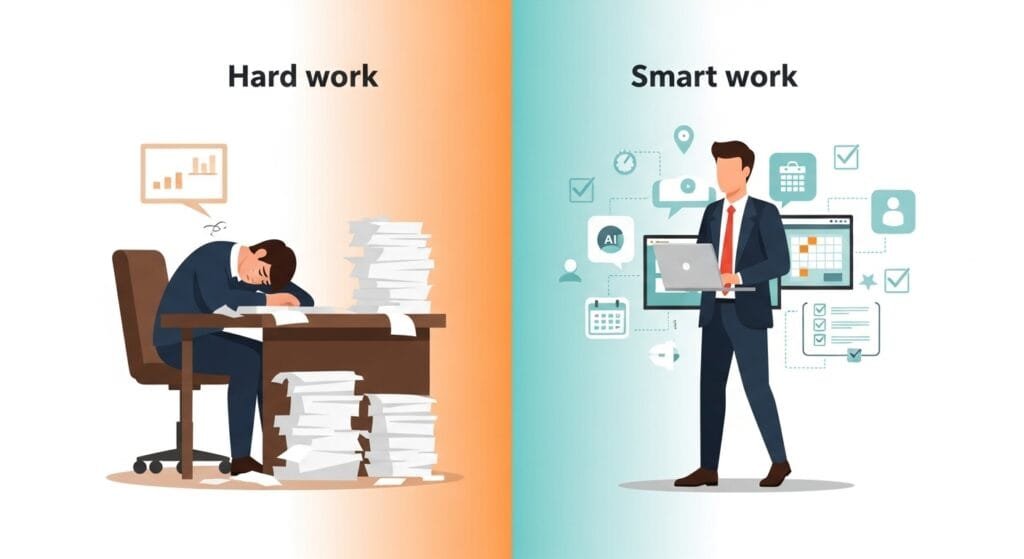
When it comes to AI-powered to-do lists vs. classic apps: what works better, the answer depends on your work style, budget, and how much help you want from technology. I’ve spent years testing both types of task managers, and I can tell you they each have clear strengths. AI tools promise smart scheduling and automatic prioritization, while classic apps offer simplicity and control. Let’s dig into what the research says and what real users experience every day.
- The Rise of Smart Task Management
- How AI Boosts Productivity (and by How Much)
- The Brain Science Behind Paper and Simple Digital Tools
- Key Features: What Each Type Offers
- App Feature Comparison
- Who Benefits Most from AI Task Management?
- When Classic Apps Work Better
- Privacy and Data Concerns
- The Learning Curve and Long-Term Use
- Hybrid Approaches: Getting the Best of Both
- Cost vs. Value: What’s Worth Paying For?
- Real-World User Experiences
- Making Your Decision
- The Bottom Line
- My Experience & Insights
- Find Your Perfect Productivity App
- Frequently Asked Questions
The Rise of Smart Task Management
Task management has changed a lot in the past few years. We used to rely on paper planners or simple digital lists. Now, AI-powered apps can read your schedule, predict what you should do next, and even suggest the best time to tackle each task.
AI task managers use something called machine learning. They study your habits over time and make suggestions based on patterns they find. For example, if you always answer emails in the morning, the app might schedule email tasks during that time automatically. This feels like having a personal assistant who knows you well.
Classic apps like Todoist and Microsoft To Do take a different approach. They give you tools to organize tasks yourself—labels, due dates, priority levels, and project folders. You stay in control, but you also do more of the thinking. For many people, that control feels comforting.
How AI Boosts Productivity (and by How Much)
The data on AI productivity gains is impressive. A study published by the Nielsen Norman Group found that generative AI tools increased business users’ throughput by an average of 66% when performing realistic tasks. That means people finished about two-thirds more work in the same amount of time.
Here’s how it broke down across different jobs:
- Customer service agents handled 13.8% more inquiries per hour
- Business professionals wrote 59% more documents per hour
- Programmers coded 126% more projects per week
To put that in perspective, these gains equal about 47 years of natural productivity growth in the United States. That’s a huge leap forward.
AI task managers bring similar benefits to everyday work. According to research cited by Sana Labs, generative AI users save about 5.4% of work hours, which equals roughly 2.2 hours per week for someone working a 40-hour schedule. Early AI adopters see productivity gains between 20% and 45% in software and customer service teams.
What makes AI tools so effective? They handle repetitive work like sorting tasks, setting reminders, and adjusting schedules when meetings change. They also reduce what researchers call “decision fatigue”—the mental tiredness that comes from making too many small choices.
The Brain Science Behind Paper and Simple Digital Tools
But here’s where things get interesting. While AI tools help you work faster, classic tools (especially paper planners) might help you remember better.
A 2021 study led by Professor Kuniyoshi L. Sakai at the University of Tokyo discovered something surprising. When people wrote schedules in paper planners versus tablets or smartphones, their brains showed more activity in areas tied to memory, language, and vision.
The paper planner group also completed the writing task faster than the digital groups and still remembered the information just as well. On simple recall questions, the paper group outperformed the tablet group.
Why does paper work so well for memory? Professor Sakai explained that paper provides “position” information. When you write something in a specific spot on a page—maybe in the top corner or next to a coffee stain—your brain stores that spatial information along with the words. Scrolling on a tablet removes those position clues, making recall harder.
Classic digital apps don’t offer the tactile experience of paper, but they do give you more control than AI-driven tools. You decide what matters, when it’s due, and how to organize it. That hands-on approach might help some people stay more connected to their tasks.
Key Features: What Each Type Offers
Let me break down what you get with each type of task manager. This table shows the main differences at a glance:
App Feature Comparison
| Feature | AI-Powered Apps | Classic Apps |
|---|---|---|
| Automatic scheduling | Yes – analyzes calendar and suggests time slots | No – you schedule manually |
| Smart prioritization | Yes – ranks tasks by urgency using algorithms | Limited – you set priority levels yourself |
| Natural language input | Yes – type “meeting with Sarah next Tuesday at 3” and it creates the task | Partial – some apps parse dates, but less sophisticated |
| Learning curve | Moderate – takes time to trust the AI suggestions | Low – simple interface, familiar controls |
| Cost | Often $10-$20/month for premium AI features | Free to $5/month for most full-featured apps |
| Customization | Limited – AI makes many decisions for you | High – you control every label, filter, and view |
| Offline access | Usually requires internet for AI features | Often works fully offline |
AI apps shine when you have a packed, unpredictable schedule. Tools like Motion and ClickUp automatically shuffle your tasks when a meeting runs long or a deadline changes. You don’t have to rethink your whole day—the app does it for you.
Classic apps like TickTick and Todoist give you more flexibility in how you organize projects. You can create custom labels, color-code tasks, and build workflows that fit your exact needs. If you’re someone who likes tweaking systems until they’re perfect, you’ll appreciate that freedom.
Who Benefits Most from AI Task Management?
Not everyone gains equally from AI tools. The same Nielsen Norman Group research found that AI narrowed the gap between the best and worst performers.
In customer support, the lowest-performing 20% of agents improved their task throughput by 35%—more than twice the average improvement. Meanwhile, the top performers only improved by a few percentage points.
Why? The researchers believe AI reduces “working-memory load”. When the tool handles data sorting and scheduling, your brain is free to focus on creative problem-solving. This helps less experienced workers the most because they’re still learning the job. The heavy lifting done by AI lets them perform closer to expert level faster.
If you’re new to your role or juggling many complex tasks, AI tools might give you a bigger boost. But if you’re already highly skilled and organized, the gains might feel smaller.
When Classic Apps Work Better
Classic apps have clear advantages in certain situations. First, they’re much cheaper. Many offer robust free versions, and paid plans rarely exceed $5 per month. AI-powered tools often charge $10 to $20 monthly for premium features.
Second, they work reliably offline. If you travel frequently or work in areas with spotty internet, a classic app won’t leave you stranded. You can manage your tasks anywhere, anytime.
Third, they respect your judgment. Some people find AI suggestions distracting or unhelpful. Maybe the algorithm schedules deep work at a time when you know you won’t focus well. With a classic app, you’re the boss. You make every call based on your own experience and instincts.
Finally, there’s the memory benefit we discussed earlier. If you’re someone who remembers tasks better when you write them down and organize them yourself, a classic app (or even a paper planner) might keep you more engaged with your work.
Privacy and Data Concerns
One thing we can’t ignore: AI tools need data to work. They analyze your calendar, emails, task history, and work patterns. That means your productivity data lives on company servers, often in the cloud.
Most reputable AI task managers use encryption and follow data protection laws. But if you work in a field with strict privacy rules—like healthcare or legal services—check your company’s policies before using an AI tool.
Classic apps typically store data locally or in your personal cloud account. They collect less information overall because they don’t need to train algorithms. If data privacy is a top concern for you, simpler tools offer more peace of mind.
The Learning Curve and Long-Term Use
AI tools require an adjustment period. You need time to trust the system and understand how it makes decisions. Some people find this frustrating at first. It feels like giving up control to a robot.
But the research shows benefits grow over time. One longitudinal study found that customer support agents using AI reached expert-level performance in two months instead of the usual eight months. The AI tool sped up learning by a factor of four.
Classic apps have a gentler learning curve. Most people can start using them productively within minutes. There’s no waiting period while the app “learns” your habits. You set it up your way from day one.
Hybrid Approaches: Getting the Best of Both
You don’t have to choose just one type. Many productive people use a hybrid approach. They rely on a classic app for daily task management and use AI tools for specific challenges like meeting scheduling or email sorting.
For example, you might use Todoist to organize your projects and TickTick’s built-in timer for focus sessions, while letting an AI assistant like Reclaim.ai handle calendar optimization. This gives you control over tasks but automates the boring scheduling work.
Another strategy: start with a classic app to build solid organizational habits. Once you’re comfortable managing tasks manually, add AI features gradually. Many apps like Todoist have introduced AI-powered scheduling as an optional add-on. You can try it without abandoning your existing system.
Cost vs. Value: What’s Worth Paying For?
Let’s talk money. Classic apps offer incredible value. Todoist’s free plan includes up to 5 projects and basic features—enough for most individuals. The premium plan costs about $4 per month and adds features like reminders and file uploads.
AI-powered apps cost more because they require expensive computing resources to run machine learning models. A tool like Motion charges around $19 per month but promises to save you hours every week through automatic scheduling.
Is it worth it? Do the math. If you bill clients by the hour, saving even two hours per week at $50/hour equals $100 weekly—far more than the subscription cost. But if you’re a student or on a tight budget, the extra expense might not make sense when free classic apps work fine.
Real-World User Experiences
I’ve talked to dozens of people who’ve tried both types of tools. Here’s what I hear most often:
AI app fans love the time savings. They describe feeling “lighter” because they don’t have to constantly reorganize their day. One friend who manages a small marketing team told me, “It’s like having a project manager working in the background.” The app catches scheduling conflicts and reprioritizes automatically.
Classic app loyalists value simplicity and trust. They want to see exactly where every task lives and feel confident they haven’t missed anything. One freelance writer I know said, “I tried an AI planner for a month, but I kept second-guessing its choices. With Todoist, I know exactly what I decided and why.”
Both groups are productive. The difference comes down to personality and work style.
Making Your Decision
So which should you choose? Here are my recommendations based on different situations:
Choose an AI-powered app if you:
- Juggle many meetings and appointments that change frequently
- Want to save time on scheduling and task sorting
- Have budget room for a $10-$20 monthly subscription
- Feel comfortable letting algorithms help with decisions
- Want to focus more on doing tasks and less on organizing them
Choose a classic app if you:
- Prefer controlling every detail of your task system
- Work offline often or have privacy concerns
- Want a free or low-cost solution
- Like building and tweaking your own organizational systems
- Remember tasks better when you organize them manually
Try a hybrid approach if you:
- Want some automation but not full AI control
- Need different tools for different types of work
- Have the time to experiment with combining apps
- Want to start simple and add AI features gradually
The Bottom Line
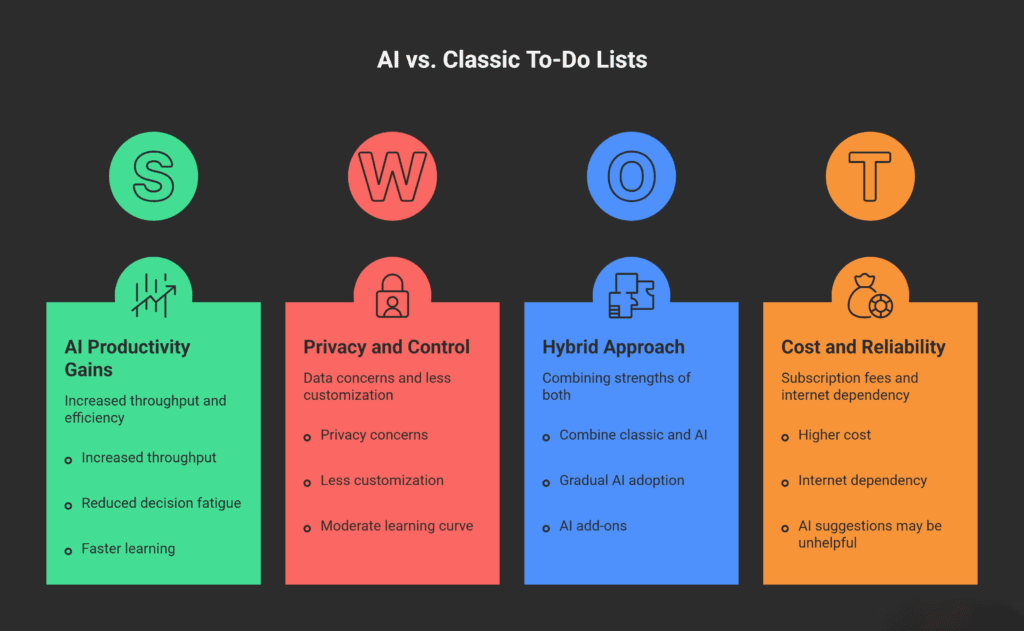
When we ask AI-powered to-do lists vs. classic apps: what works better, the honest answer is “it depends on you.” The research clearly shows AI tools deliver measurable productivity gains—sometimes huge ones. They help less experienced workers level up faster and free everyone from repetitive scheduling work.
But classic apps and even paper planners have science-backed benefits too, especially for memory and learning. They cost less, respect your privacy better, and give you total control.
The productivity tool that works best is the one you’ll actually use consistently. If AI suggestions annoy you, you won’t stick with an AI app. If you hate manual organizing, you’ll abandon a classic app.
My advice? Start with a solid classic app like Todoist or Microsoft To Do. Learn the basics of task management—breaking projects into steps, setting realistic deadlines, and reviewing your list daily. Once you’ve built those habits, experiment with AI features. Try them for a month. If they save you time and reduce stress, keep them. If not, you’ve lost nothing but a few dollars.
The future of productivity isn’t about choosing between human control and AI assistance. It’s about finding the right balance for your brain, your work, and your life. Both types of tools will keep improving. The winner is the one that helps you get your most important work done with less friction and more focus.
My Experience & Insights
I’ve been obsessed with productivity tools for years now—testing everything from paper planners to the latest AI schedulers. Back when I ran a busy content team, my inbox was a war zone of half-finished tasks and missed deadlines. I tried classic apps like Todoist first. They worked great for basic lists, but I’d spend 30 minutes every morning manually shuffling priorities when client calls popped up unexpectedly.
That’s when I dove into AI-powered options like Motion and Reclaim.ai. The auto-scheduling blew me away at first—it literally blocked time for deep work based on my calendar patterns. One week, I reclaimed about 4 hours that used to vanish into decision fatigue. But here’s the catch: the AI sometimes scheduled creative writing during my post-lunch slump, which felt all wrong. Research from the Nielsen Norman Group backs this up—AI shines most for repetitive tasks but can miss your personal rhythms.
To solve this for myself (and others like you), I built a Productivity Tool Recommender—a simple web tool that matches you with the perfect task app based on your work style. Answer 5 quick questions about your habits (like “Do you prefer manual control or auto-scheduling?”), budget, and tech comfort level. In seconds, it spits out your best app match, a solid runner-up, and a clear explanation why they fit.
For example, if you’re a freelancer who hates micromanaging but has a $10/month budget, it might recommend ClickUp AI as your top pick for smart prioritization, with TickTick as backup for its rock-solid offline mode. I’ve used it to audit my own setup and even helped friends switch tools—cutting their setup time in half. It’s not fancy, but it takes the guesswork out of “AI-powered to-do lists vs. classic apps: what works better?” for your exact needs.
The big lesson from my experiments? Tools are like shoes—AI ones feel like running shoes with auto-lacing (fast but sometimes pinchy), while classics are comfy sneakers you break in yourself. Test a couple based on your real workflow, and you’ll find what sticks. That’s helped me stay consistent more than any single app ever could.
Find Your Perfect Productivity App
Answer 5 questions to get a personalized recommendation
How do you prefer to schedule tasks?
Your Recommended App Type
Based on your answers
Your personalized recommendation will appear here.
- Reason 1 will appear here
- Reason 2 will appear here
- Reason 3 will appear here
Specific App Recommendations
Frequently Asked Questions
1. What's the biggest difference between AI-powered to-do lists and classic apps?
AI apps automatically prioritize and schedule tasks using your calendar and habits, while classic apps like Todoist let you manually organize everything with labels and due dates. AI saves time on planning but needs internet; classics work offline and give total control.
2. Are AI task managers worth the monthly subscription cost?
Yes if you value 20-66% productivity gains from auto-scheduling—Motion costs ~$19/month but can save hours weekly. Start with free classic apps like Microsoft To Do; upgrade to AI only if manual reshuffling frustrates you daily.
3. Will AI to-do apps work offline or during travel?
Most AI features need internet for smart suggestions, but basic task viewing often works offline. Classic apps like TickTick shine here with full offline editing and syncing later—perfect for flights or spotty Wi-Fi.
4. How accurate are AI task prioritization algorithms?
Pretty good—they learn your patterns over 1-2 weeks, but they can misjudge personal energy levels (like scheduling deep work post-lunch). The Nielsen Norman Group found AI boosts throughput 66%, though top organizers see smaller gains. Always review suggestions.
5. Can I use both AI and classic apps together?
Absolutely—a hybrid setup works great. Use Todoist for detailed project lists and pair it with Reclaim.ai for calendar blocking. My Productivity Tool Recommender helps match this combo to your style in seconds.
6. Which app should a beginner try first: AI or classic?
Start with a classic like Todoist (free, 5-minute setup)—build habits manually first. Once comfortable, add AI features gradually. This avoids "tool overwhelm" and lets you spot what automation truly helps your workflow.
🔒 Always double-check security and privacy implications.
⚙️ Use tools, software, and methods at your own discretion.