
🔒 Always double-check security and privacy implications.
⚙️ Use tools, software, and methods at your own discretion.
Are you tired of feeling like your brain is a browser with 50 tabs open? Finding the right AI tools for focus can be the secret weapon you need to finally reclaim your workday. We’ve all been there—you sit down to finish a project, and suddenly you’re three layers deep into a social media rabbit hole. It’s not just you; research shows the average person is interrupted every three minutes at work!
Today, I want to walk you through how smart tech can actually act as a shield for your attention instead of a drain on it. Let’s dive into the world of “Quiet AI.”
How Tech Became Our Focus Friend

For a long time, we thought of “tech” and “distraction” as the same thing. But things are changing. Instead of just giving us more pings and dings, new AI tools are designed to filter the noise.
Think of it like having a very organized personal assistant. This assistant doesn’t just hand you a pile of mail; they sort it, throw away the junk, and tell you exactly what needs your eyes right now. Experts like Dr. Itiel Dror, a cognitive neuroscientist at University College London, often discuss how our brains have limited capacity. When we use AI to handle the “boring” stuff, we save our mental energy for the big, creative tasks.
7 Top AI Tools for Focus
Not all tools are created equal. Some help you plan, some help you block out the world, and others help you get started when you feel stuck. Here are the best ones I’ve found that actually help you stay in the zone.
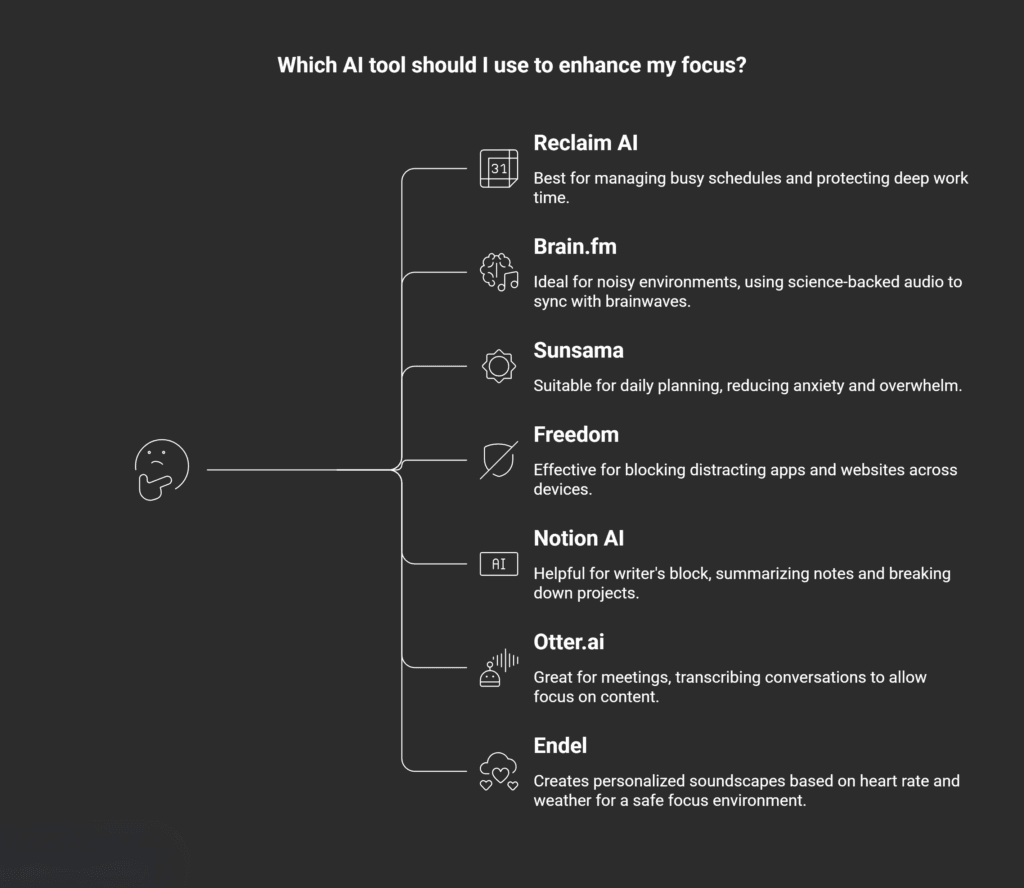
1. Reclaim AI (The Smart Calendar)
If your calendar looks like a game of Tetris, Reclaim AI is for you. It uses AI to find the best times for your “Focus Work” based on your habits. If a meeting gets rescheduled, it automatically moves your focus block to a new spot so you don’t lose that time.
2. Brain.fm (The Science-Backed Radio)
This isn’t just a playlist. Brain.fm uses AI to create music that guides your brain into a state of focus. It uses something called “neural phase locking” (basically, rhythm that syncs with your brainwaves). It’s perfect for when you need to “tune out” a noisy office or a loud neighbor.
3. Notion AI (The Thought Organizer)
Ever stared at a blank page and felt your focus slip away? Notion AI helps by summarizing long notes or breaking big projects into tiny, easy steps. It takes away the “scary” part of starting a task, which is often when we get most distracted.
4. Freedom (The Digital Guard)
While not “AI” in the traditional chatbot sense, Freedom uses smart automation to block distracting apps and websites across all your devices at once. You can schedule “Focus Sessions” where the internet literally won’t let you visit Reddit or Instagram.
5. Otter.ai (The Meeting Mimic)
Stop worrying about taking notes during a call. Otter.ai listens and writes everything down for you. This lets you actually focus on the person talking instead of frantically typing.
6. Endel (The Mood Mapper)
Similar to Brain.fm, Endel creates personalized soundscapes. But here’s the cool part: it changes the sounds based on your heart rate (from your watch) and the weather outside! It’s all about creating an environment where your brain feels safe to focus.
7. Sunsama (The Mindful Planner)
Sunsama is like a daily ritual. It pulls tasks from your email and Slack and helps you pick just a few things to do. It uses AI to help you realize when you’re over-planning, which helps prevent that “overwhelmed” feeling that leads to distraction.
Comparing the Top Contenders
To help you choose, I put together this quick table. It shows which tool might fit your specific “distraction” problem.
Focus & Productivity Tools
Click on any table header to sort. Use the dropdown to filter by primary benefit.
| Tool Name | Best For… | Primary Focus Benefit |
|---|---|---|
| Reclaim AI | Busy Schedules | Protects time for deep work automatically. |
| Brain.fm | Noisy Environments | Uses science-backed audio to lock in focus. |
| Sunsama | Daily Planning | Reduces “to-do list” anxiety and overwhelm. |
| Freedom | App/Web Addiction | Physically blocks your “guilty pleasure” sites. |
| Notion AI | Writer’s Block | Summarizes info so you don’t get lost in notes. |
Why Using AI for Focus Actually Works
You might wonder, “Isn’t adding more tech just going to make it worse?” It’s a fair question! But here is what the experts say. Professor Shoshana Zuboff, an emerita professor at Harvard Business School and author of The Age of Surveillance Capitalism, has spent years looking at how digital environments affect our behavior.
The key is intention. When we use AI to limit our choices rather than expand them, we win.
Key Insights for Success:
- The 25-Minute Rule: Many of these tools work great with the Pomodoro Technique (working for 25 minutes, then taking a 5-minute break).
- Context Loading: AI is great at “loading context.” As noted in Psychology Today, you can ask an AI like ChatGPT, “Where did I leave off on this project?” to help your brain get back in the groove faster.
- Reducing “Trivial” Decisions: Every time you decide what to do next, you use up focus. AI tools that prioritize your list for you save that energy for the actual work.
A Human Touch in a Tech World
At the end of the day, these tools are just tools. They’re like a high-quality hammer—they won’t build the house for you, but they sure make it easier on your hands.
I’ve found that the best way to use these AI tools for focus is to start small. Don’t try to download all seven at once! Pick one that solves your biggest headache. If you’re always distracted by noise, try Brain.fm. If you’re always losing your “deep work” time to meetings, try Reclaim.
Remember what Dr. Ethan Kross, a professor of psychology at the University of Michigan and author of Chatter, suggests: our internal dialogue can often be our biggest distraction. Using AI to externalize your thoughts—like dumping your to-do list into a smart planner—can quiet that inner noise.
Final Thoughts
We live in a world that is designed to steal our attention. Using AI to fight back isn’t just smart; it’s almost necessary. By automating the planning, blocking the junk, and setting the right mood, you give your brain the space it needs to do its best work.
So, which of these sounds like it could help you the most? Sometimes, just one small change in how we manage our digital life can make the whole day feel lighter.
My Experience & Insights
While researching the best ways to stay on track, I came across a startling statistic from Dr. Gloria Mark, a leading researcher at the University of California, Irvine. Her work shows that our attention span on any given screen has plummeted to an average of just 47 seconds. When I first read that, it hit home. I realized I wasn’t just “bad at focusing”—I was fighting a digital environment designed to keep me distracted.
To make this easier for you, I’ve spent the last few months testing these tools in my own workflow. I found that the biggest hurdle isn’t the tech itself, but choosing the wrong tool for your specific type of distraction. For instance, I used to think I needed a better “to-do list,” but after reading Nir Eyal’s insights on indistractable habits, I realized my real issue was “internal triggers”—basically, I was checking Slack every time I felt a tiny bit of stress.
Focus Zone Finder
I wanted to give you a way to skip the trial and error. I developed a small web app called the Focus Zone Finder. It’s a simple tool where you can answer five quick questions about your daily habits, and it will tell you exactly which AI tool matches your biggest distraction pattern.
Try the Focus Zone Finder: Discover which AI tool matches your biggest distraction pattern in 60 seconds. It includes personalized tool recommendations and optimization tips to get you started.
Using this tool helped me realize that I didn’t need more “productivity” apps; I needed a “digital gatekeeper” to filter my noise. As Professor Shoshana Zuboff at Harvard points out, our digital environments are often built to extract our attention. By using the right AI intentionally, we aren’t just adding another app—we’re building a shield.
Find Your Focus AI Match
Answer 5 quick questions to discover which AI tool best addresses your biggest distraction pattern.
1. Where do you lose most time during work?
2. How does procrastination usually hit you?
3. What’s your biggest meeting frustration?
4. How do you handle information overload?
5. Your ideal focus environment is…
Your Match: Reclaim AI
You need protection from calendar chaos. Reclaim AI automatically defends your deep work time by intelligently scheduling focus blocks around meetings.
Pro Tip:
Connect it to your Google Calendar and set “Focus Blocks” as non-negotiable appointments that automatically reschedule when conflicts arise.
Your Match: Brain.fm
Your focus suffers from environmental noise. Brain.fm uses AI-generated audio with neural phase locking to create a scientific focus bubble around you.
Pro Tip:
Use “Focus” mode with noise-cancelling headphones for 25-minute sessions, then switch to “Meditation” mode during breaks.
Your Match: Freedom
Digital temptation is your kryptonite. Freedom physically blocks distracting sites/apps across all devices during scheduled focus sessions.
Pro Tip:
Start with blocking just 2-3 “guilty pleasure” sites for 90-minute sessions, then gradually increase duration and blocked sites.
Your Match: Notion AI
Information overload paralyzes your progress. Notion AI summarizes, organizes, and breaks down complex projects into actionable steps.
Pro Tip:
Use the AI to summarize meeting notes immediately after calls, then auto-generate next-action items from the summary.
Your Match: Sunsama
Planning anxiety prevents execution. Sunsama creates mindful daily plans that prevent overcommitment and reduce “to-do list” overwhelm.
Pro Tip:
Start each morning with the 5-minute planning ritual. Let it pull tasks from your email, then consciously choose only what you’ll actually complete.
Frequently Asked Questions
Can AI actually help me focus, or is it just another digital distraction?
It’s a fair question! Most tech is designed to steal our attention, but “Focus AI” works differently. Instead of pinging you with notifications, these tools act as filters. For example, tools like Freedom or Brain.fm create a “digital bubble” by blocking distracting sites or using neural-syncing audio to quiet your brain’s internal noise. The key is using AI with intention—using it to limit your choices rather than giving you more things to click on.
What is the best AI tool for someone who struggles with “Writer’s Block”?
If you find yourself staring at a blank screen, Notion AI or ChatGPT are excellent for “priming the pump.” You can ask them to summarize your messy research notes or create a simple outline. This reduces the “cognitive load” (the mental effort) required to start. Once the AI gives you a rough starting point, your brain finds it much easier to take over and enter a flow state.
Are these AI tools safe to use with my private work data?
Security is a top priority in 2026. Most reputable tools like Otter.ai and Microsoft Copilot have enterprise-grade privacy settings. However, a good rule of thumb is the “Public Website Rule”: if you wouldn’t post the information on a public blog, don’t paste it into a basic AI prompt. Always check if the tool has a “Privacy Mode” that prevents your data from being used to train their future models.
How do I stop “multitasking” when I have so many digital meetings?
Multitasking is often a myth that actually lowers your IQ by 10 points in the moment! To stop the cycle, try an AI meeting assistant like Otter.ai. By letting the AI handle the note-taking, you free your brain to focus entirely on the conversation. This “single-tasking” approach helps you remember more details and feel less drained by the end of the day.
Is there a free AI tool for focus that actually works?
Yes! Many of the best tools have powerful free versions. Sunsama offers a free trial to help you get your first week organized, and Endel has free “Daily Soundscapes” that work great for quick focus sessions. Additionally, the free version of ChatGPT is fantastic for breaking down large, scary tasks into smaller, manageable steps that won’t overwhelm you.
Does listening to AI-generated music really change my brainwaves?
It sounds like sci-fi, but it’s based on a process called neural phase locking. Research from experts like Dr. Itiel Dror
suggests that rhythmic patterns can help the brain synchronize its electrical activity. AI music tools like Brain.fm use specific frequencies to “nudge” your brain into a Beta-wave state (associated with alertness) or a Flow state, making it easier to ignore background noise.
🔒 Always double-check security and privacy implications.
⚙️ Use tools, software, and methods at your own discretion.