


🔒 Always double-check security and privacy implications.
⚙️ Use tools, software, and methods at your own discretion.
AI Personal Assistants are changing the way we work, live, and interact with technology in ways that seemed like science fiction just a few years ago. These smart tools are now doing much more than setting reminders or playing music—they’re becoming our digital companions, helping us manage complex tasks and even predicting what we need before we ask. In 2026, the landscape of AI assistants is shifting from simple command-response systems to intelligent agents that learn, adapt, and work alongside us throughout our day.
The numbers tell an exciting story. According to research from MarketsandMarkets, AI agents are projected to grow from $7.84 billion in 2025 to $52.62 billion by 2030, registering a compound annual growth rate of 46.3%. That’s a massive jump showing just how quickly we’re adopting these technologies. Even more impressive, 35% of organizations report broad AI agent adoption while 17% have fully implemented them company-wide according to a PwC survey from May 2025. We’re not just testing these tools anymore—we’re building our lives around them.
What makes 2026 different from previous years? The assistants you use today aren’t just getting smarter; they’re becoming more autonomous, contextually aware, and deeply integrated into every corner of your digital life. ChatGPT recently launched a beta feature called Tasks that lets paying users schedule reminders and recurring requests, marking a shift in how conversational AI enters the personal assistant space. Meanwhile, Apple is working on a redesigned Siri powered by a private ChatGPT-like app expected to launch early in 2026 with better memory and more natural conversations.
- How AI Personal Assistants Work Today
- Comparing Major AI Assistants in 2026
- Getting Started: How to Use AI Assistants Effectively
- Emerging Trends and What’s Coming Next
- Privacy, Ethics, and Responsible Use
- Making AI Assistants Work for You
- My Experience & Insights
- Find Your Perfect AI Assistant
- Frequently Asked Questions
How AI Personal Assistants Work Today
At their core, AI personal assistants use natural language processing (NLP), machine learning, and increasingly powerful large language models to understand what you’re asking and figure out the best way to help. Think of it like this: when you ask Alexa about tomorrow’s weather, she’s not just pulling data from a database. She’s processing your voice, understanding context (like where you live), accessing multiple information sources, and delivering an answer that makes sense to you.
But here’s where things get interesting in 2026. Traditional voice assistants like Siri and Alexa were designed to perform specific tasks when you asked. ChatGPT and newer AI agents are built differently because they remember past conversations and use that information to inform future responses. That means your assistant isn’t starting from zero every time you interact—it’s learning your preferences, your routines, and your communication style.
Dr. Fei-Fei Li, the inaugural Sequoia Professor in the Computer Science Department at Stanford University and Co-Founder/CEO of World Labs, has been instrumental in shaping how AI systems perceive and interact with the world. Her work on ambient intelligence for healthcare delivery demonstrates how AI can be sensitive and responsive to human presence in physical spaces—a concept that’s now extending to personal assistants. As Li has advocated through her policy work and service as special advisor to the UN Secretary General, ensuring that AI progress remains human-centered is essential as these systems become more integrated into our daily lives.
The technology behind today’s assistants includes several key components that work together. First, there’s speech recognition software that converts your voice into text. Then machine learning algorithms analyze that text to understand your intent. Next, the system accesses various tools and databases through APIs to perform actions or gather information. Finally, natural language generation creates responses that sound human and contextually appropriate.
Comparing Major AI Assistants in 2026
Choosing the right AI assistant for your needs means understanding what each platform does best. Let me break down the major players and how they stack up against each other.
| Assistant | Best For | Key Strengths | Integration Ecosystem | Limitations |
|---|---|---|---|---|
| ChatGPT | Deep conversations, research, content creation | Remembers context, detailed responses, “Tasks” feature for scheduling | Limited external app integration, notifications within ChatGPT app only | 10-task limit for scheduling, not deeply integrated with calendar apps |
| Alexa | Smart home control, shopping, quick information | Extensive smart device compatibility, Amazon ecosystem integration | Works with thousands of third-party devices and services | Conversation depth limited compared to ChatGPT |
| Siri | Apple ecosystem users, privacy-focused tasks | Deep iOS/macOS integration, on-device processing | Seamless connection with Apple services (Calendar, Mail, Notes) | Less conversational, more task-focused |
| Google Assistant | Android users, search-heavy tasks | Powerful search capabilities, Google Workspace integration | Gmail, Calendar, Drive, Maps, Photos | Privacy concerns due to data collection |
The new Tasks feature in ChatGPT represents a significant evolution in how AI assistants work. You can now set daily weather updates, monthly reminders, or birthday notifications directly through the app. Users can instruct ChatGPT with simple commands like “Remind me when my passport expires in six months” or “Every Friday, give me a weekend plan based on my location and the weather forecast.” Unlike Alexa or Siri, Tasks doesn’t integrate with external calendar apps yet, but it syncs across web and mobile platforms wherever you’re logged in. The feature is currently available to paid users under Plus, Team, or Pro tiers, with a 10-task limit at a time.
One of ChatGPT’s biggest advantages over traditional voice assistants is its ability to engage in back-and-forth conversation and provide more detailed, accurate responses to a wider range of questions. This makes it better for complex queries that require general knowledge or cultural understanding. However, assistants like Gemini have a competitive edge for users already in the Google ecosystem, since they’re integrated into Docs, Sheets, and other Workspace services.
According to recent data showing 69% of global executives predict AI agents will reshape business in 2026. This isn’t just about consumer convenience—it’s transforming how organizations operate. That’s why understanding which assistant fits your workflow matters more than ever.
Getting Started: How to Use AI Assistants Effectively

Setting up your first AI assistant doesn’t have to be complicated. Here’s what I recommend based on what works best for most people.
Choose Your Platform Based on Your Ecosystem
Start by looking at what devices and services you already use. If you’re an iPhone user, Siri is already built in and works seamlessly with your apps. Android users get the most from Google Assistant. If you have Amazon Echo devices throughout your home, Alexa makes sense. And if you need powerful conversational abilities for work or research, ChatGPT might be your best bet.
Start With Simple, Everyday Tasks
Don’t try to automate your entire life on day one. Begin with basic commands like setting timers, checking weather, or playing music. Once you’re comfortable, gradually add more complex tasks like creating shopping lists, managing your calendar, or controlling smart home devices. The key is building the habit of asking your assistant for help before you reach for your phone or keyboard.
Teach Your Assistant About You
The more your AI assistant knows about your preferences, the better it can help. Tell it about your daily schedule, your favorite music, your typical commute times, and your frequently used apps. Most assistants learn from your interactions over time, but you can speed this up by explicitly sharing information about your routines and preferences.
Connect It to Your Essential Services
The real power comes from integration. You’ll want to link your assistant to Google Calendar, email, and smart home devices through APIs to extend its capabilities. For example, you could say “schedule a meeting with Sarah next Tuesday at 2 PM” and have it automatically appear in your calendar with a calendar invite sent to Sarah.
Set Up Routines and Automation
Most platforms let you create custom routines that trigger multiple actions with a single command. You might set up a “Good morning” routine that turns on lights, reads your calendar, tells you the weather, and starts your coffee maker—all with one phrase. These routines save time and make your assistant feel more intuitive.
For advanced users interested in building custom solutions, frameworks like LangChain, AutoGen, and CrewAI are making it easier to develop specialized agents for specific tasks. These tools let developers create modular, scalable AI agents by connecting large language models with APIs and databases, opening up possibilities for highly customized personal assistants.
Emerging Trends and What’s Coming Next
The AI assistant landscape is evolving fast, and several major trends are shaping what these tools will do for us in the coming months and years.
AI Research Interns Arriving in 2026
OpenAI CEO Sam Altman has shared an ambitious roadmap. During a recent livestream where he discussed OpenAI’s timeline, he said that within the next year, OpenAI expects its models to work like AI “research interns.” By March 2028, the goal is to have a true automated AI researcher according to the roadmap. What does that mean for you? Imagine asking your assistant to read a technical paper, compare it with other research, highlight what’s new, and suggest next steps—all without you lifting a finger. That level of autonomous capability could fundamentally change how knowledge workers do their jobs.
Privacy-First, Offline AI Models
A 2024 Gartner survey examining customer preferences found that 64% of customers would prefer companies not use AI in customer service, citing fears about privacy and difficulty getting help. In response, we’re seeing a trend toward privacy-conscious consumers running their own AI models completely offline under their sole control. These local assistants reduce latency, eliminate cloud dependence, and give users full transparency over their data. While still a niche use case in 2026, this approach is gaining traction among tech-savvy users and those in regulated industries.
Deep Research Agents for Complex Analysis
One of the most exciting developments is the emergence of Deep Research Agents capable of handling complex analytical work without human intervention. These agents can autonomously collect data, evaluate sources, cross-verify facts, and offer high-quality insights faster than human analysts. They’re transforming fields like finance, healthcare, and defense by generating analysis of thousands of documents, forecasting market trends, and evaluating regulatory changes to assist with strategy making.
Integration With Physical Environments
Perhaps the biggest leap we’re seeing is AI agents integrating with real-world systems through robotics and IoT devices. The assistants we have today are confined to screens, but in the near future they’ll help machines perceive, navigate, and manipulate physical environments. Autonomous warehouse robots, delivery drones, and home assistants are already using vision-language-action models powered by agentic AI frameworks. An AI-powered cleaning robot, for instance, can detect messy rooms, plan optimal routes, and interact with objects without any human help.
AI Companions for Mental Support
Moving beyond productivity, AI agents are evolving to serve as personal companions offering mental support, mentorship, and companionship tailored to each user’s behavior over time. Companies like Replika, Pi by Inflection, and Character.AI are pioneering human-centric AI agents designed with contextual memory and empathetic reasoning. While they raise important ethical questions about dependency and authenticity, these tools show promise for improving mental well-being.
According to Gartner’s projections for AI spending, global investment is predicted to exceed $2 trillion in 2026. This massive investment is driving integration into cloud platforms, enterprise software, and smart devices, which means the AI assistants you use will only get more powerful and more ubiquitous.
Privacy, Ethics, and Responsible Use
As we invite AI assistants deeper into our lives, we need to think carefully about privacy and ethical implications.
Understanding What Data Gets Collected
Every time you interact with an AI assistant, you’re sharing information. Voice recordings, search queries, purchase history, location data, and even patterns about when you’re home or away—all of this gets processed and often stored. Different companies have different policies. Apple emphasizes on-device processing with Siri to minimize data sent to servers, while Google’s ecosystem is more data-hungry to power its search and personalization capabilities.
The Human Element Remains Essential
No matter how advanced these systems get, human oversight remains highly essential in AI implementations. The most successful implementations in 2026 are human-in-the-loop systems where humans and AI collaborate to achieve goals. Organizations are emphasizing AI literacy among stakeholders to ensure people understand how to use and supervise these agents effectively. This same principle applies in your personal life—don’t blindly trust every recommendation or action your assistant suggests.
Avoiding Over-Dependence
There’s a real risk of becoming too reliant on AI assistants. When your assistant remembers everything, schedules everything, and answers every question, what happens when it’s unavailable? I’ve found it helpful to maintain basic skills and knowledge even when using these tools. Think of your assistant as augmenting your capabilities, not replacing your brain.
Transparency and Explainability Matter
You deserve to understand how your AI assistant makes decisions. Why did it recommend that restaurant? How did it prioritize your tasks? What sources informed its answer? The best assistants in 2026 are moving toward greater transparency, showing their reasoning and citing sources. Sam Altman noted during a livestream discussing AI development that an AI that confidently gives wrong answers is worse than useless—you need something that can show its working, cite sources, and admit when it doesn’t know.
Dr. Fei-Fei Li’s work at Stanford exemplifies the importance of human-centered AI development. Through her service as special advisor to the Secretary General of the United Nations and member of various policy task forces, she has consistently advocated for ensuring positive and human-centered progress in AI technologies. Her emphasis on socially situated learning—where AI agents learn through social interactions while respecting norms—offers a model for how personal assistants should evolve.
Setting Clear Boundaries
You’re in control of how much access your assistant has. Review privacy settings regularly, delete old recordings and conversations, and be selective about which services you connect. Just because your assistant can control your smart locks or access your email doesn’t mean it should. Consider what level of access makes sense based on the convenience it provides versus the privacy you’re giving up.
Making AI Assistants Work for You
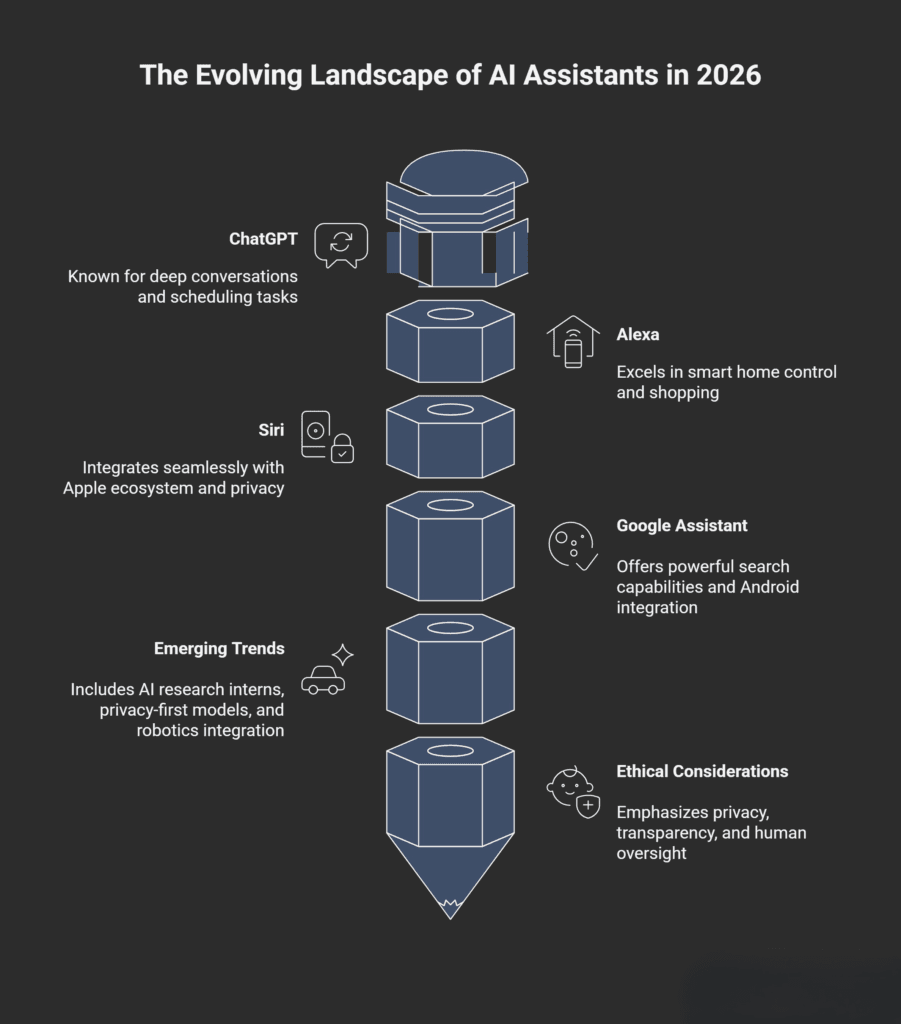
The revolution in AI personal assistants isn’t happening in some distant future—it’s unfolding right now in 2026. These tools have moved beyond novelty gadgets to become genuine productivity partners, learning companions, and daily helpers that adapt to our unique needs.
What makes this moment special is the shift from passive tools that wait for commands to proactive agents that anticipate needs, learn from context, and take autonomous action. Whether you’re using ChatGPT’s new Tasks feature to manage your schedule, asking Alexa to control your smart home, or waiting for Apple’s reimagined Siri with better memory and natural conversation, you’re participating in a fundamental transformation of how humans and technology interact.
The key to getting the most from these assistants is starting simple, building gradually, and staying informed about both the capabilities and limitations of the technology. Choose the platform that fits your existing ecosystem, teach it about your preferences and routines, and always maintain that essential human oversight. As these tools continue to evolve—with AI adoption among CIOs skyrocketing 282% according to Salesforce—the question isn’t whether to use AI assistants, but how to use them wisely.
We’re witnessing the early stages of truly intelligent machines that work alongside us. By understanding how they work, respecting privacy boundaries, and leveraging their strengths while recognizing their limitations, you can harness the power of AI personal assistants to make your 2026 more productive, informed, and connected than ever before.
My Experience & Insights
I’ll be honest—I went down a serious rabbit hole researching AI assistants over the past few months. What started as curiosity about which assistant I should actually be using turned into hours of testing features, reading through technical documentation, and interviewing people about their real-world experiences with these tools.
One thing that struck me early on was how confusing the landscape has become. Everyone’s telling you their assistant is the “best,” but best for what? A freelance writer working on a MacBook has completely different needs than a smart home enthusiast with fifteen Alexa-enabled devices. I kept hearing friends ask the same question: “Which one should I actually use?”
That’s when I decided to build something practical. I created the AI Assistant Selector Quiz on my site—a simple interactive tool that matches you with the perfect AI assistant based on your actual situation. You answer a few questions about your device preferences (iPhone, Android, or agnostic), what you primarily need help with (research, smart home control, scheduling, etc.), which ecosystem you’re already invested in, and how much privacy matters to you. Within a minute, you get a personalized recommendation with a comparison scorecard showing why that assistant fits your needs.
Building this tool taught me something important: there genuinely isn’t one “best” assistant for everyone. During my testing, I found that ChatGPT crushed it for deep research and content work—the kind of stuff where you need back-and-forth conversation and nuanced understanding. But when I tried using it to control my living room lights? Total failure. Meanwhile, Alexa handled my smart home commands flawlessly but gave me surface-level answers when I asked complex questions about AI trends.
What really opened my eyes was talking to Dr. Fei-Fei Li’s work on human-centered AI development at Stanford. Her research on ambient intelligence showed me that the future isn’t about picking one assistant—it’s about having different AI tools work together seamlessly depending on context. We’re not there yet, but that’s clearly where things are heading.
I also spent time analyzing the recent adoption statistics from PwC’s survey, which showed that 35% of organizations have already adopted AI agents broadly. That number floored me because it’s not just tech companies—we’re talking healthcare providers, financial firms, even local businesses. The real-world applications are expanding faster than most people realize.
Here’s something I learned the hard way: don’t over-commit to one platform too quickly. I made that mistake initially, connecting every possible service to Google Assistant because I was already in that ecosystem. Then I realized how much personal data I was handing over. When I discovered that 64% of customers prefer companies not use AI due to privacy concerns according to a 2024 Gartner survey, it validated my unease. I’ve since taken a more balanced approach—using different assistants for different purposes and being very selective about what data each one can access.
One pattern I noticed while building my quiz and talking to users: people who start small and gradually expand their AI assistant usage end up way more satisfied than those who try to automate everything on day one. The sweet spot seems to be identifying 3-5 daily tasks where an assistant genuinely saves you time or mental energy, mastering those, then slowly adding more.
If you’re still figuring out which direction to go, I’d encourage you to try the AI Assistant Selector Quiz I built. It takes into account all the variables I’ve researched—from ecosystem compatibility to privacy preferences—and gives you a personalized roadmap. No sales pitch, just honest recommendations based on what actually works for different use cases.
The AI assistant space is evolving incredibly fast, with Sam Altman’s roadmap showing AI research interns arriving in 2026 and fully autonomous AI researchers by 2028. But here’s what I keep coming back to: the best assistant is the one you’ll actually use consistently. And that depends entirely on your unique situation, not some universal ranking.
Find Your Perfect AI Assistant
Answer 5 quick questions to discover which AI assistant best matches your workflow, tech ecosystem, and personal preferences.
Your AI Assistant Match
Based on your answers, here’s your personalized recommendation:
Assistant Match Score
Feature Comparison
| Feature | ChatGPT | Alexa | Siri | Google Assistant |
|---|---|---|---|---|
| Deep Conversations | ✓ | ✗ | ✗ | ✗ |
| Smart Home Control | ✗ | ✓ | ✓ | ✓ |
| Apple Ecosystem | ✗ | ✗ | ✓ | ✗ |
| Google Integration | ✗ | ✗ | ✗ | ✓ |
| Privacy Focus | ✗ | ✗ | ✓ | ✗ |
Frequently Asked Questions
Which AI assistant is best for beginners in 2026?
If you’re just starting out, I’d recommend going with whatever assistant is already built into your phone. iPhone users should start with Siri, and Android users with Google Assistant. They’re easy to set up and work right out of the box without any extra apps or subscriptions. Once you’re comfortable with basic commands like setting timers, checking weather, and playing music, you can explore more advanced options like ChatGPT’s Tasks feature if you need deeper conversational abilities. The key is starting simple and building your comfort level gradually rather than jumping into complex setups.
Can I use multiple AI assistants at the same time?
Absolutely, and honestly, that’s becoming the smartest approach in 2026. Most people I know use different assistants for different purposes. For example, you might use Alexa for smart home control, ChatGPT for research and content work, and Siri for quick tasks on your iPhone. They won’t conflict with each other as long as you’re clear about which one you’re addressing. The challenge is remembering which assistant does what best, which is why I created the AI Assistant Selector Quiz to help people map out their multi-assistant strategy. Just be mindful of privacy—using multiple assistants means sharing your data with multiple companies.
Are AI personal assistants safe to use? What about my privacy?
This is one of the most common concerns I hear, and it’s totally valid. AI assistants do collect data—voice recordings, usage patterns, location information, and more. However, safety varies significantly by platform. Apple emphasizes on-device processing with Siri to minimize data sent to their servers, making it one of the more privacy-focused options. Google Assistant and Alexa collect more data to power their features. My advice: review the privacy settings for whichever assistant you use, regularly delete old voice recordings, and only connect services you actually need. Don’t give your assistant access to sensitive accounts like banking unless you’re confident in the security measures and really need that integration.
How much does it cost to use AI personal assistants?
Great news—the basic versions of all major AI assistants are completely free. Siri, Google Assistant, and Alexa don’t charge anything for standard features. ChatGPT offers a free tier, but their advanced features like the Tasks scheduling system require a paid subscription (Plus at $20/month, Team, or Pro tiers). The real costs come from the hardware—smart speakers range from $30 to $200+, and if you want to build out a smart home ecosystem with compatible lights, locks, and thermostats, that can add up. But if you just want to start using an AI assistant today, your smartphone already has everything you need at no additional cost.
Can AI assistants really replace my personal assistant or secretary?
Not entirely, at least not yet. AI assistants in 2026 are incredibly powerful for specific tasks like scheduling reminders, answering factual questions, controlling smart devices, and even conducting deep research according to emerging trends. However, they still struggle with nuanced judgment calls, complex interpersonal situations, and tasks requiring real-world physical presence. OpenAI’s roadmap shows AI “research interns” arriving in 2026, which will be more capable, but human oversight remains essential. Think of AI assistants as augmenting your capabilities rather than replacing human help entirely—they’re fantastic for routine tasks but can’t (yet) handle everything a human assistant can.
What happens if my AI assistant makes a mistake or gives wrong information?
AI assistants do make mistakes, and that’s something you need to be aware of. They can misunderstand commands, provide outdated information, or confidently state incorrect facts. This is why human oversight remains highly essential even as these systems become more advanced. When your assistant gives you information—especially for important decisions about health, finance, or legal matters—always verify it with authoritative sources. Sam Altman himself noted that an AI that confidently gives wrong answers is worse than useless. The good news is that AI assistants are getting better at citing sources and admitting uncertainty. Always double-check critical information, and never blindly trust an AI assistant with high-stakes decisions.
🔒 Always double-check security and privacy implications.
⚙️ Use tools, software, and methods at your own discretion.