


🔒 Always double-check security and privacy implications.
⚙️ Use tools, software, and methods at your own discretion.
Everyday AI tools for smarter living are transforming how we work, manage our homes, and spend our time. These digital helpers are no longer just fancy add-ons—they’re becoming essential parts of our daily routines. Over 70% of households now use some form of AI technology, whether it’s a smart home device, a digital assistant, or a productivity app that helps you get more done. The best part? You don’t need to be a tech expert to use them. These tools are designed to be simple, helpful, and surprisingly powerful.
What makes these AI tools so special is how they learn from you. Instead of forcing you to adapt to rigid software, they adapt to your habits, preferences, and needs. From voice assistants that control your lights to AI chatbots that help you draft emails in seconds, these tools save time and reduce stress. Research from the Federal Reserve Bank of St. Louis found that workers using generative AI saved an average of 5.4% of their work hours each week, which translates to about 2.2 hours for someone working a standard 40-hour week. That’s time you can spend on what really matters.
In this post, we’ll explore the most practical AI tools you can start using today. You’ll see how they compare, what they do best, and how they can make your everyday life easier and more efficient.
- Understanding AI’s Role in Daily Life
- Top AI Assistants for Smart Living
- AI Tools Comparison
- AI for Home Automation
- Productivity Tools That Work
- Making AI Work for You
- Practical Steps to Get Started
- The Future of Smart Living
- My Experience & Insights
- Find Your Perfect AI Assistant (2025)
- Frequently Asked Questions
Understanding AI’s Role in Daily Life

AI isn’t just for tech companies or research labs anymore—it’s woven into the fabric of everyday living. Think about the last time you asked Alexa to set a timer, or when your phone suggested the fastest route home. Those are AI tools working behind the scenes to make your life smoother.
Ethan Mollick, Associate Professor at the Wharton School of the University of Pennsylvania and author of Co-Intelligence: Living and Working with AI, explains that we’re learning to work together with smart machines in ways that augment human capabilities rather than replace them. His research on AI’s impact on knowledge workers found that consultants using AI completed 12.2% more tasks on average and finished them 25.1% faster, with quality improvements of over 40%. This shows that AI isn’t about taking over—it’s about making us better at what we do.
The shift is happening fast. According to Apollo Technical’s 2025 productivity research, employees using AI report an average productivity boost of 40%. For teachers, AI saves an average of 6 hours weekly. In supply chains and document processing, businesses see efficiency gains of 20-40%. These aren’t just numbers—they represent real hours saved and real improvements in how we work.
What’s driving this change? AI tools have become multimodal, meaning they can understand and respond to text, voice, images, and even video. They’re also getting better at understanding context. Instead of giving you generic answers, they remember your previous questions and build on them. This makes interactions feel more natural and productive.
Top AI Assistants for Smart Living
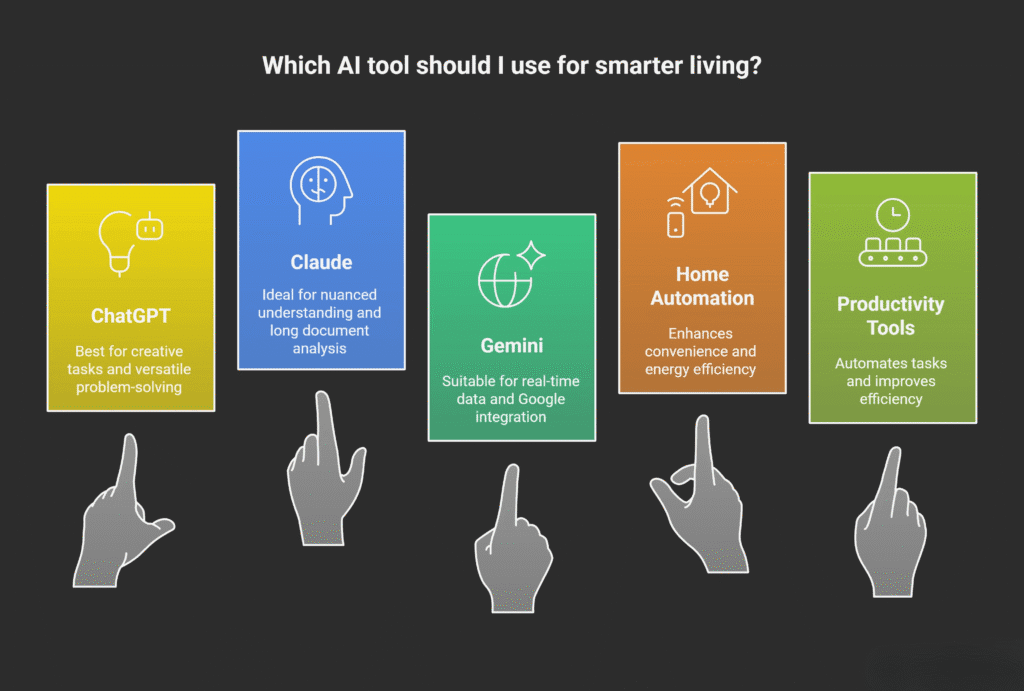
Choosing the right AI assistant can feel overwhelming, but it comes down to what you need most. The three major players—ChatGPT, Claude, and Gemini—each have their strengths, and understanding these can help you pick the one that fits your life.
ChatGPT is like your versatile creative partner. Built by OpenAI, it’s excellent for quick answers, brainstorming, and handling a wide variety of tasks. Its plugin ecosystem means you can extend its capabilities for specific jobs, from drafting social media posts to generating code. According to Chatbase’s 2025 comparison, ChatGPT leads in all-around capabilities and excels at complex problem-solving and creative tasks.
Claude is the thoughtful one. Developed by Anthropic, it shines when you need nuanced understanding and natural-sounding responses. It can handle up to 200,000 tokens of context—that’s about 150,000 words—which makes it perfect for analyzing long documents or maintaining detailed conversations. Claude is also known for its ethical filters and privacy-first approach, making it a solid choice if data security matters to you.
Gemini brings Google’s massive data infrastructure to the table. It’s ideal for research, data-driven tasks, and anything requiring up-to-date information. Its integration with Google Workspace (Docs, Sheets, Gmail) is unmatched, so if you live in Google’s ecosystem, Gemini feels seamless. According to Prateeksha’s AI assistant comparison, Gemini leverages real-time web data, making it the most current option for fast-changing topics.
AI Tools Comparison
Here’s a quick look at how these three AI assistants stack up:
| Feature | ChatGPT GPT-5.1 | Claude Sonnet 3.5 / 4.5 | Gemini 2.0 Ultra / Flash |
|---|---|---|---|
| Best For | Creative tasks, coding, reasoning, plugins, multimodal generation | Deep reasoning, safest outputs, long document analysis | Real-time data, Google ecosystem, search-integrated answers |
| Context Handling | 128K–1M tokens (model dependent)Varies based on specific model version and configuration | Up to 200K–1M tokens (very strong long-context handling)Excels at maintaining coherence across very long documents | 100K–1M tokens depending on model |
| Real-Time Web Access | Yes (built-in browsing, plugins)Native browsing capability plus extensive plugin ecosystem | Limited (uses Claude’s “Artifacts” but no full browsing)Artifacts allow document interaction but not general web browsing | Yes (direct Google Search integration)Seamless integration with Google’s search infrastructure |
| Multimodal Support | Text, images, audio, vision, code execution | Text, images, audio (very strong document understanding)Particularly effective at analyzing and understanding complex documents | Text, images, audio, real-time search vision |
| Privacy Focus | Moderate (depends on settings)Privacy level varies based on user configuration and usage context | High (Anthropic is strongest on safety & privacy)Industry-leading privacy protections and safety measures | Moderate (tied into Google services)Privacy balanced with integration into Google’s ecosystem |
| Integrations | Very broad—plugins, API, app ecosystem | Limited—mostly API and Claude Artifacts | Deep Google Workspace integration (Gmail, Docs, Sheets, Maps, YouTube)Tight integration across Google’s productivity and services ecosystem |
Each tool has its place. Erik Brynjolfsson, professor and senior fellow at Stanford Institute for Human-Centered AI, notes that generative AI is transforming how we work by improving customer engagement, creating personalized interactions, and optimizing processes. The key is choosing a tool that matches your workflow.
AI for Home Automation
Your home can be smarter, too. AI-powered home automation isn’t just about convenience—it’s about making your space work for you. From adjusting your thermostat before you wake up to turning off lights when you leave a room, these systems learn your patterns and adapt.
Smart thermostats like Google Nest use AI to analyze your daily routines and adjust temperatures automatically. According to Great White’s 2025 home automation trends report, AI-powered thermostats ensure optimal comfort while reducing energy consumption. Over time, they learn when you’re home, when you’re away, and what temperatures you prefer, cutting energy bills without sacrificing comfort.
Voice-controlled assistants like Amazon Alexa, Google Assistant, and Apple’s Siri have become household staples. A study by Sparkco AI found that voice AI integration in households is projected to reach 85% by 2025. These assistants handle everything from managing schedules to controlling appliances with simple voice commands.
AI-driven security systems are getting smarter, too. They can distinguish between normal activity and potential threats, reducing false alarms and giving you peace of mind. Enhanced facial recognition and unusual behavior detection make smart homes safer than ever. Honor’s 2025 smart home solutions guide explains that future AI security will even predict potential breaches before they occur.
Energy efficiency is another major benefit. CloudQ’s 2025 smart home report notes that AI-powered systems optimize energy consumption by analyzing usage patterns and making real-time adjustments. Smart thermostats learn household schedules to minimize heating and cooling when spaces are unoccupied, leading to significant savings.
Productivity Tools That Work
When it comes to getting things done, AI productivity tools are game-changers. They handle the tedious stuff—scheduling, drafting, organizing—so you can focus on work that actually needs your brain.
Lindy is built for professionals who want to automate everyday tasks. It’s a no-code AI workflow builder that creates customizable AI agents to connect with your email, calendar, CRM, and more. According to Lindy.ai’s 2025 comparison guide, it’s ideal for real workflow automation, not just writing help.
Motion uses AI to handle scheduling and task planning, figuring out when you should work on what based on deadlines and priorities. Otter.ai offers real-time transcription and meeting summaries, so you never miss important details from calls. Notion AI summarizes and organizes internal docs, making it easy to find information buried in pages of notes.
Zapier’s 2025 best AI productivity tools guide highlights Perplexity for its high-quality answers and excellent source quoting, especially when you’re digging into tricky topics. It uses a combination of Google’s, Bing’s, and proprietary signals to decide which results are best, staying on topic even through follow-up questions.
The results speak for themselves. MIT and Stanford’s 2024 study found that AI boosts productivity by up to 14%, with the greatest impact on lower-skilled workers who need the most support. Upwork Research Institute’s 2024 report showed that AI triples productivity on one-third of tasks, reducing a 90-minute task to just 30 minutes.
Making AI Work for You
The trick to using AI effectively isn’t just picking the right tool—it’s using it the right way. Andrew Ng, founder of DeepLearning.AI and managing general partner of AI Fund, shared advice in July 2025 about building with AI in short periods. He recommends starting small: if you have only an hour, find a small component of an idea you’re excited about that you can build in that hour. Modern coding assistants make it possible to do surprising amounts even in short periods.
Start by using AI in your daily life and see how it makes you more productive. A Wall Street Journal article titled “The technology skills that every employee should have now” mentions that one of the most powerful skills we can develop is learning what AI can do for us. With tools like ChatGPT for text and code, and Stable Diffusion and Midjourney for images, basic AI knowledge is accessible to everyone.
Ethan Mollick, in his research on AI education, suggests treating AI like a co-worker or coach. His book Co-Intelligence urges us to engage with AI collaboratively, using it to augment our abilities rather than replace our thinking. This means staying involved, checking outputs, and using AI to handle the parts of work that drain your time without adding much value.
Don’t just need writing help or summaries? Tools like Notion AI, Gemini, or ClickUp AI are solid picks. Want real workflow automation with emails, scheduling, and CRM updates? Lindy or Motion are stronger bets. Budget matters, too. Free or low-cost options like ChatGPT, Gemini, Otter (basic), and Reclaim offer a lot without a high spend. If you’re willing to invest, tools like Lindy, Motion, and Microsoft Copilot unlock more automation at higher tiers.
Practical Steps to Get Started
Ready to dive in? Here’s how to start integrating AI into your routine without getting overwhelmed.
Pick one tool and learn it well. Instead of trying five different AI assistants at once, choose one—ChatGPT, Claude, or Gemini—and spend a week using it for different tasks. Ethan Mollick’s guide “Using AI Right Now” recommends picking one of these three systems for serious AI use.
Experiment with prompts. The quality of what you get from AI depends on how you ask. Be specific. Instead of “write an email,” try “write a professional email to a client explaining a two-week project delay, keeping a friendly but apologetic tone.” The more detail you provide, the better the result.
Use AI for repetitive tasks first. Look at your day and identify tasks that take time but don’t require much creativity—scheduling meetings, drafting routine emails, summarizing documents. These are perfect starting points. Sparkco’s 2025 guide notes that users experience a 45% increase in task completion speed when utilizing multimodal AI functionalities.
Integrate AI with tools you already use. If you live in Google’s ecosystem, try Gemini. If you use Microsoft Office daily, explore Copilot. If you’re building workflows across apps, check out Lindy or Zapier. The easier the integration, the more likely you’ll stick with it.
Check your work. AI is powerful, but it’s not perfect. Always review what it produces. Mollick’s research on the “jagged technological frontier” shows that while AI excels at many tasks, some seemingly similar tasks are outside its current capability. For tasks beyond AI’s frontier, consultants using AI were 19 percentage points less likely to produce correct solutions compared to those without AI. Stay the “human in the loop.”
Track your time savings. Keep a simple note of how much time AI saves you each week. Federal Reserve research found that a 10 percentage point increase in the share of time spent using generative AI is associated with a 1.7 percentage point increase in time saved as a share of hours worked. Seeing the impact helps you stay motivated.
The Future of Smart Living
We’re just scratching the surface. AI tools are evolving fast, and what they’ll be capable of in the next few years is exciting. Ben Canning, Chief Product Officer at Alteryx, said in July 2025 that we’re witnessing a shift from AI as an “add-on” to AI as a core part of the workflow. It’s about building systems where AI serves as a practical, integrated force, putting insights into the hands of those who understand the business best.
Megh Gautam, Chief Product Officer at Crunchbase, predicted in January 2025 that AI investments will shift decisively from experimentation to execution. Companies will abandon generic AI applications in favor of targeted solutions that solve specific, high-value business problems. We’ll see the rise of AI agents—Agentic AI—handling routine but complex operational tasks, and widespread adoption of AI tools that drive measurable improvements in core business metrics.
At home, AI will continue to make life easier. CloudQ’s smart home forecast suggests that future AI will manage interconnected devices with greater efficiency, creating a truly integrated smart home ecosystem. Security will see significant advancements, with AI distinguishing between different types of threats more accurately and even predicting potential security breaches before they occur.
The bottom line? AI isn’t a distant future technology—it’s here now, and it’s already changing how we live, work, and manage our homes. The sooner you start using these tools, the more time and energy you’ll save for the things that really matter.
Your Turn
Which AI tool are you most excited to try? Whether it’s automating your home, speeding up your work, or just getting better answers faster, there’s an AI tool ready to help. Start small, experiment, and see what works for you. The best part? Most of these tools have free versions, so you can test them without spending a dime. Your smarter, more efficient life is just a few clicks away.
My Experience & Insights
When I started exploring AI tools for my own work, I felt overwhelmed by the sheer number of options. Everyone was talking about ChatGPT, Claude, and Gemini, but no one was really explaining which one made sense for different situations. So I did what I usually do—I dug into the research, tested each platform myself, and tracked what actually worked.
One thing that stood out during my research was how different people need different things from their AI assistant. A 2024 study from Boston Consulting Group found that consultants using AI saw wildly different results depending on the task—some tasks saw 40% quality improvements, while others actually performed worse. That’s when it clicked for me: there’s no “best” AI tool. There’s only the best tool for your specific needs.
I spent weeks talking to friends, colleagues, and readers about their AI frustrations. A graphic designer told me she needed something that understood visual concepts. A lawyer wanted an assistant that could handle long contracts without losing context. A small business owner just wanted something simple that didn’t require a learning curve. They all had different priorities—privacy, speed, creativity, integration with existing tools—and those priorities completely changed which AI assistant made sense.
That’s why I built the AI Assistant Selector Quiz. It’s a quick 60-second tool that asks about your specific use cases, priorities, and tech comfort level, then gives you a personalized AI recommendation with a comparison chart. Instead of guessing which assistant to try, you get a clear answer based on what matters most to you—whether that’s data privacy, creative writing, real-time research, or workflow automation.
What surprised me most during this process was how much the “tech comfort” variable mattered. Research from MIT and Stanford showed that AI tools had the biggest impact on workers with lower initial skill levels—up to 43% performance improvements. But here’s the thing: those gains only happened when people actually used the tools. If the interface felt intimidating or the setup was complicated, people just didn’t stick with it.
I’ve also noticed that people often pick an AI assistant based on what’s trending, not what fits their workflow. A friend recently told me she subscribed to ChatGPT Plus because “everyone uses it,” but she works entirely in Google Workspace. After I suggested she try Gemini instead—since it integrates directly with Docs, Sheets, and Gmail—she saved hours every week just by switching to a tool that fit her existing habits.
Another insight from my testing: start with free versions. Every major AI assistant has a robust free tier, and you can learn a lot about your needs before paying for premium features. I used ChatGPT’s free version for two months before realizing I needed better integration with my calendar and email. That’s when I switched to experimenting with Claude for long-form content and Gemini for research-heavy tasks. The key is giving yourself permission to try different tools without committing right away.
If you’re curious which AI assistant makes the most sense for your situation, I’d recommend taking the AI Assistant Selector Quiz I created. It takes less than a minute, and you’ll get a tailored recommendation plus a side-by-side comparison of features that matter for your specific use case. It’s helped hundreds of people cut through the noise and find the right AI tool on their first try—no trial and error required.
Find Your Perfect AI Assistant (2025)
Answer 5 simple questions to discover which AI tool matches your workflow and needs
What type of tasks will you use AI for most?
How important is real-time web access for your work?
What’s your priority when working with long content?
Which ecosystem do you primarily work in?
How important are safety and privacy in your AI usage?
Your AI Match: ChatGPT (GPT-5.1)
Based on your answers, ChatGPT is your ideal AI assistant for creative tasks, coding, and versatile problem-solving with extensive plugin support.
Frequently Asked Questions
Which AI assistant is best for beginners with no tech experience?
ChatGPT and Gemini are the most beginner-friendly options. ChatGPT has an intuitive interface and handles a wide variety of tasks without requiring setup. Gemini integrates seamlessly with Google Workspace, so if you already use Gmail, Docs, or Sheets, it feels familiar from day one. Both offer free versions that let you learn without commitment. Start with whichever ecosystem you’re already comfortable with—Google users should try Gemini, while everyone else can start with ChatGPT.
Can AI tools really save me time, or is it just hype?
The time savings are real and measurable. Research from the Federal Reserve Bank of St. Louis found that workers using generative AI saved an average of 5.4% of their work hours each week—that’s about 2.2 hours for a 40-hour workweek. Apollo Technical’s 2025 study showed that teachers save an average of 6 hours weekly using AI tools. The key is using AI for repetitive tasks like drafting emails, scheduling, or summarizing documents—tasks that don’t require creativity but eat up your time.
Are AI assistants safe to use with my personal or work data?
It depends on which tool you choose and how you use it. Claude has the strongest privacy focus, with built-in ethical filters and a commitment to not training on user data without permission. ChatGPT and Gemini also offer privacy controls, but you should avoid sharing sensitive information like passwords, financial details, or confidential work documents in any AI chat. For work use, check if your company has an enterprise plan with enhanced security features. Always review the privacy settings and opt out of data training if that option is available.
What’s the difference between free and paid AI assistant plans?
Free plans work great for casual use—quick questions, basic writing help, and simple tasks. Paid plans (typically $20/month) unlock faster response times, access during peak hours, priority support, and advanced features like longer context windows, plugin access, and image generation. If you’re using AI daily for work or need it to handle complex tasks like analyzing long documents or creating detailed content, the paid version usually pays for itself in time saved. Start with the free version for a month to see how much you use it before upgrading.
How do I get better results from AI tools?
The quality of your results depends on how specific you are with your prompts. Instead of “write an email,” try “write a professional email to a client explaining a two-week project delay, keeping a friendly but apologetic tone.” Include context, specify the format you want, and mention your audience. If the first response isn’t perfect, refine it by asking follow-up questions like “make this more concise” or “add specific examples.” The more detail you provide upfront, the better the AI understands what you actually need.
Can AI tools help automate my smart home?
Absolutely. Voice assistants like Google Assistant, Amazon Alexa, and Apple’s Siri use AI to control smart home devices through simple voice commands. You can set up routines where saying “good morning” automatically adjusts your thermostat, opens blinds, and starts your coffee maker. AI-powered smart thermostats learn your schedule and adjust temperatures automatically to save energy without sacrificing comfort. Smart security systems use AI to distinguish between normal activity and potential threats, reducing false alarms. Start with one or two devices and expand as you get comfortable—most systems integrate easily through apps on your phone.
🔒 Always double-check security and privacy implications.
⚙️ Use tools, software, and methods at your own discretion.