


🔒 Always double-check security and privacy implications.
⚙️ Use tools, software, and methods at your own discretion.
If you’re drowning in emails and endless to-do lists, 7 everyday AI tools that save you an hour a day might sound like a dream. But here’s the thing—they’re real, and they work. We’re all stuck doing repetitive tasks that drain our energy and steal time from what actually matters. What if there’s a smarter way forward?
AI tools have quietly shifted from futuristic concepts to everyday helpers. These aren’t just shiny toys for tech enthusiasts—they’re practical solutions that can genuinely give you back precious hours. Whether you’re a busy professional, a content creator, or someone managing multiple projects, the right AI tools cut through the noise and let you focus on meaningful work.
In this guide, I’ll walk you through seven AI tools that deliver real results, plus how they support a simpler, more intentional approach to work and life.
- Why AI Tools Matter for Daily Productivity
- The 7 AI Tools That Actually Save Time
- ChatGPT: Your All-Purpose AI Assistant
- Grammarly: Error-Free Communication
- Perplexity AI: Lightning-Fast Research
- Fathom: Meeting Notes on Autopilot
- Notion AI: Zero-Meeting Task Management
- Zapier: Your Workflow Automation Hub
- NotebookLM: Turn Content into Knowledge
- Comparing the Top AI Productivity Tools
- Minimalism Lifestyle
- How to Build Your AI Productivity Stack
- Common Mistakes to Avoid
- The Future of AI-Powered Productivity
- Start Small, Think Big
- My Experience & Insights
- Accurate AI Productivity Calculator
- Frequently Asked Questions
Why AI Tools Matter for Daily Productivity

AI productivity tools use artificial intelligence to automate tasks, sharpen decision-making, and lift the mental burden of repetitive work. Think of them as having a virtual team working 24/7—a writing assistant, research analyst, personal organizer, and project manager all in one.
The numbers tell a compelling story. Recent data shows that 76% of offices worldwide now use ChatGPT in their everyday work, with employee usage nearly doubling from the previous year. Even more striking, research from Stanford’s AI Index confirms that AI boosts productivity and helps narrow skill gaps across the workforce.
But here’s what most people miss: it’s not just the three minutes you save per email that counts. It’s the mental load of crafting, editing, and perfecting each message that disappears. That’s real productivity—getting back your mental energy for work that actually moves the needle.
The 7 AI Tools That Actually Save Time
Let’s dive into the tools that can genuinely transform your workday. These aren’t theoretical solutions—they’re battle-tested by thousands of professionals who’ve reclaimed their time.
ChatGPT: Your All-Purpose AI Assistant
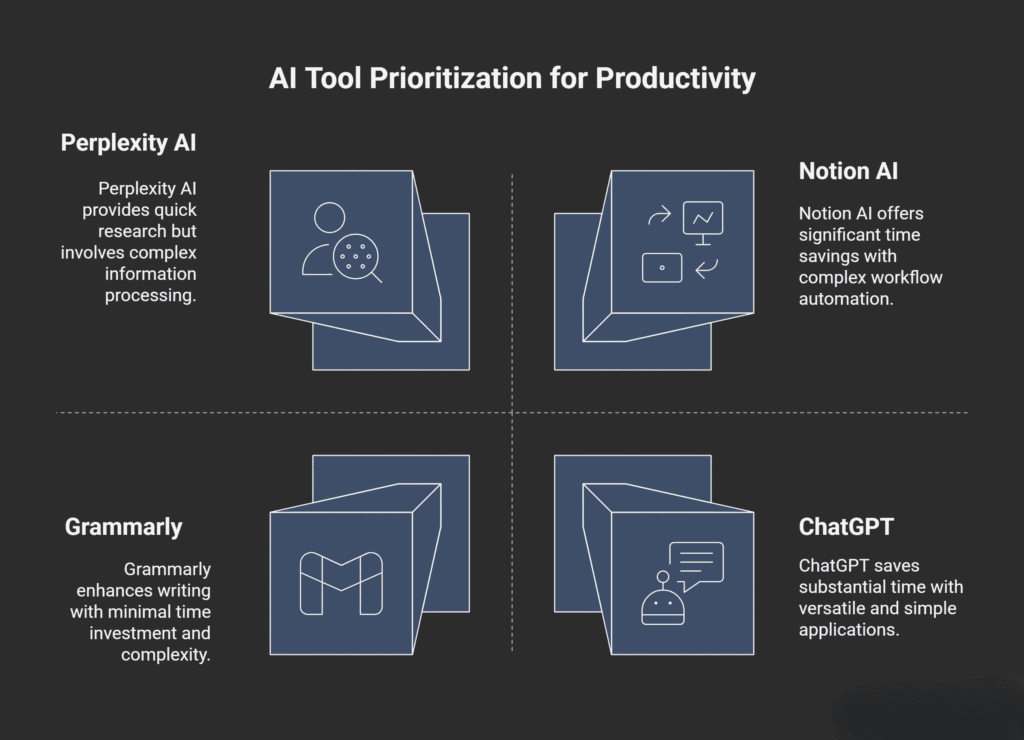
ChatGPT is the Swiss Army knife of AI tools, handling everything from writing and analysis to brainstorming and problem-solving. It’s now even more powerful with web search for real-time information, DALL-E integration for visuals, and personalized assistance that adapts based on your chat history.
You can use it to beat the blank page by creating outlines and first drafts for emails, blog posts, or even legal documents. Need to summarize long emails or book chapters? Feed them to ChatGPT and get concise notes you can actually use. It’s also brilliant for converting technical jargon into plain language—imagine explaining quantum theory to a fifth-grader.
Through its Zapier integration, ChatGPT connects with thousands of apps, making it possible to automate complex workflows seamlessly.
Time saved: Approximately 8 hours per week
Best for: Content creation, planning, brainstorming, and simplifying complex ideas
Pricing: Free (Plus: $20/month)
Grammarly: Error-Free Communication
Grammarly goes way beyond basic spell-checking. This AI-powered writing assistant checks grammar, tone, clarity, and engagement in all your written communication. The full-sentence rewrite suggestions transform complex ideas into clear, compelling messages.
What makes Grammarly special is its tone detection feature, which helps you strike the right balance between professional and approachable. Whether you’re drafting a sensitive email to a colleague or writing content for your blog, Grammarly ensures your message lands exactly as intended. One user who’s been paying for Grammarly’s premium subscription for nearly three years says “it’s worth every penny.”
Time saved: Approximately 1 hour per week
Best for: Polishing business communication and writing professionally
Pricing: Free (Premium: $12-30/month)
Perplexity AI: Lightning-Fast Research
When you need quick research or fact-checking, Perplexity AI delivers answers with sources in seconds instead of minutes of searching. Unlike traditional search engines that give you links to dig through, Perplexity provides direct, conversational answers with citations.
It’s particularly powerful for staying current on rapidly changing topics and cross-referencing information from multiple sources simultaneously. The numbered footnotes linking to original sources make it easy to verify information and dive deeper when needed.
Time saved: Approximately 30 minutes per week
Best for: Quick research, fact-checking, and staying current on complex topics
Pricing: Free (Pro: $20/month)
Fathom: Meeting Notes on Autopilot
Fathom records, transcribes, and summarizes meetings using advanced natural language processing and speaker recognition technology. It integrates seamlessly with Zoom, Google Meet, and Microsoft Teams.
The real magic happens after your meeting ends. Fathom accurately captures multiple discussion points—crucial for complex meetings where accuracy matters. What sets it apart is its ability to pinpoint actionable items instead of overwhelming you with lengthy transcripts. One professional from Synthesia noted: “It’s one of those tools that makes you wonder how you ever worked without it.”
Time saved: Approximately 1 hour per week
Best for: Recording meetings, transcribing conversations, and creating action items
Pricing: Free (Premium: $19/month)
Notion AI: Zero-Meeting Task Management
Notion AI combines project management with AI, enabling teams to automate workflows and make data-driven decisions. Acting as a central hub, it handles everything from quick notes to complex databases.
One of Notion AI’s standout strengths is its ability to pull data from connected tools like Slack and Google Drive, making it invaluable for managing team knowledge. The Q&A feature based on your own data generates answers and points you to the sources, revealing insights you recorded in meetings years ago.
For example, it can automatically turn new tasks in Asana into a project brief and notify your team via Slack. Many teams use it to eliminate most meetings, handling communication and task updates asynchronously.
Time saved: Approximately 5 hours per week
Best for: Workflow automation, team operations, and reducing meetings
Pricing: Free basic (AI add-on: $8-10/user/month)
Zapier: Your Workflow Automation Hub
Zapier connects different apps and automates workflows between them. With over 5,000 app integrations, it transforms manual processes into smart, automated workflows that run continuously in the background.
The AI-powered Zap builder lets you create automations using natural language prompts, and the AI chatbots feature even lets you build no-code customer service bots. You can connect tools like Asana with Gmail and automatically create calendar events from form submissions—the possibilities are nearly endless.
Time saved: Approximately 2 hours per week
Best for: Cross-tool automation and eliminating repetitive data transfers
Pricing: Free (Professional: $29.99/month)
NotebookLM: Turn Content into Knowledge
Google’s NotebookLM analyzes and extracts information from documents, podcasts, and videos, turning them into digestible summaries and interactive experiences. Developed by Google, it’s built for handling large volumes of information.
The Audio Overview feature is particularly powerful—it can turn research documents into podcast-style summaries perfect for consuming while walking or commuting. Upload your research materials, and NotebookLM will generate study guides, briefing docs, mind maps, and FAQs.
Time saved: Approximately 1 hour per week
Best for: Content research, extracting key points, and organizing information
Pricing: Free
Comparing the Top AI Productivity Tools
| Tool | Primary Function | Time Saved/Week | Best For | Pricing Starts At |
|---|
Minimalism Lifestyle
Here’s something that might seem contradictory at first: using technology to achieve digital minimalism. But when you think about it, the right AI tools actually help you embrace a minimalism lifestyle by reducing digital clutter and mental load.
Cal Newport, full professor of computer science at Georgetown University and author of “Digital Minimalism,” defines digital minimalism as “a philosophy of technology use in which you focus your online time on a small number of carefully selected and optimized activities that strongly support things you value, and then happily miss out on everything else.”
AI tools support this philosophy by eliminating busywork—not brainwork. They handle the repetitive stuff so you can focus on strategy, creativity, and high-level thinking. By minimizing unnecessary notifications and limiting digital distractions, you reduce the mental load of constantly being “on.”
Digital minimalism encourages you to streamline your digital environment, leading to sharper focus and deeper productivity. When your time is spent on activities that align with your values, you’re more likely to feel fulfilled and content.
The three core principles align perfectly with smart AI tool usage: clutter is costly (use AI to eliminate unnecessary apps), optimization is important (think carefully about how to use each tool), and intentionality is satisfying (keep your values in mind when choosing AI tools).
How to Build Your AI Productivity Stack
Don’t try to implement all seven tools at once—that’s a recipe for overwhelm. Instead, use this proven three-step system:
Step 1: Identify your biggest time-wasters. Look at your typical week and ask: What tasks do you do repeatedly? Where do you spend time that doesn’t require your unique skills? What drains your mental energy the most?
Step 2: Choose 1-2 AI tools to test this week. Start with the tools that address your biggest pain points. For email management, try Grammarly. For content creation, start with ChatGPT. For meetings, test Fathom. For project management, explore Notion AI.
Step 3: Build tiny habits around them. Success comes from consistency. Use ChatGPT for one specific task daily for a week. Set up one Zapier automation per week. Try one AI tool for 10 minutes each morning.
Common Mistakes to Avoid
Even the best AI tools can backfire if you’re not careful. Here are the pitfalls to watch out for:
AI over-reliance: Research shows that when employees went back to working without AI, their motivation dropped by about 11%, and feelings of boredom rose by 20%. Use AI to eliminate busywork, not brainwork.
Poor prompting: Instead of asking “How can I be more productive?” try “Can you create a 5-day time-blocking schedule for a busy entrepreneur who works 9-5, has 2 kids, and wants to grow a side business in 10 hours/week?” The second question gives context, constraints, and a clear goal.
Output overload: Losing too much time feeding prompts to AI defeats the purpose. Sharpen your cutting and editing skills to curb the excess.
Forgetting verification: A small study found that AI-aided tasks actually took 19% longer than tasks completed without AI assistance in some cases. AI tools can hallucinate facts and provide inconsistent responses—human oversight is essential.
The Future of AI-Powered Productivity
We’re standing at an inflection point. AI business usage is accelerating: 78% of organizations reported using AI in 2024, up from 55% the year before. Recent data highlights interesting trends: while 75% of knowledge workers use AI tools, positive sentiment toward these tools dropped from 70% in 2023 to 60% in 2025.
However, combining AI with traditional tools has proven to be a game-changer, delivering 137% higher satisfaction rates and reducing costs by 43%. The takeaway? AI works best when it complements, rather than replaces, your existing workflow.
The professionals who thrive in the coming years will be those who learn to work with AI, not against it—or ignore it entirely. Driven by increasingly capable small models, the inference cost dropped over 280-fold between November 2022 and October 2024, making advanced AI more accessible than ever.
Start Small, Think Big
You now know about seven powerful AI tools that can genuinely save you an hour (or more) every day. But tools are just the beginning—you also need the right systems and mindset to make them work.
Start by picking just one or two tools from this list. Give yourself permission to experiment without pressure. Track your time for a week before and after implementing a tool, so you can see the real impact. Remember that these tools should support your goals and values, rather than letting technology use you.
The goal isn’t to work more—it’s to work smarter so you can reclaim time for what truly matters. Whether that’s spending more time with family, pursuing creative projects, or simply having space to think, these AI tools can help you get there. The question isn’t whether AI can save you time—it’s whether you’re ready to let it.
My Experience & Insights
While researching AI productivity tools over the past year, I kept running into the same frustration: everyone talks about how AI “saves time,” but nobody shows you the actual math. I’d read claims like “save 8 hours per week” and think, “Okay, but what does that mean for me?”
So I dug into the numbers. According to Google Cloud’s ROI of AI 2025 report, which surveyed 3,466 senior business leaders globally, 70% of organizations are reporting productivity gains from AI tools. Even more striking, McKinsey’s latest State of AI survey found that 88% of organizations are now regularly using AI in at least one business function—up from 78% just a year ago.
But here’s what caught my attention: IBM’s 2025 study across EMEA enterprises revealed that two-thirds of organizations achieved notable operational productivity improvements, with software development and IT seeing 32% productivity gains, customer service at 32%, and procurement at 27%.
The problem? Most people can’t visualize what these percentages actually mean for their daily work. If you’re spending 20 hours a week on emails, meetings, and administrative tasks, and AI could automate 40% of that, you’d save 8 hours weekly—but without doing the calculation, that insight gets lost.
That’s why I built a dual-function calculator that lets you see both your time savings and the monetary value of implementing AI tools. To make this easier for readers, I developed the AI Tool ROI Calculator & Time Reclamation Estimator—a simple web tool where you can track exactly how much time and money you could save.
Here’s how it works: You enter your current hours spent on repetitive tasks (like email management, meeting notes, research, or content creation) and your hourly rate. The calculator then shows you both your weekly and monthly time savings based on proven automation potential, plus the actual monetary value of that reclaimed time.
For example, if you’re currently spending 10 hours per week on tasks that AI could handle with 60% efficiency, that’s 6 hours saved weekly or 24 hours monthly. At a $50 hourly rate, that translates to $1,200 in monthly value—making even a $100/month AI tool stack look like a bargain.
The toggle switch lets you flip between two views: one showing pure time reclamation (perfect for understanding your ideal workflow) and another displaying ROI (crucial for justifying AI tool investments to stakeholders or your own budget).
What surprised me during my research was how Deloitte’s 2025 AI ROI study found that nearly half of organizations use different timeframes for measuring generative AI versus agentic AI returns. For generative AI tools (like ChatGPT and Grammarly), ROI is assessed on efficiency and productivity gains within 3-6 months. For agentic AI (like advanced workflow automation), measurement focuses on cost savings and process redesign over 12-18 months.
This distinction matters because it affects when you’ll see returns. Quick-win tools like ChatGPT and Fathom deliver immediate time savings you can feel within days. Workflow automation through Zapier or Notion AI might take a few weeks to set up but compounds over time.
I also discovered through research from Stepwise’s AI automation case study that small-scale automation (just 5 daily operations taking 2 minutes each) saved 5 hours monthly, while medium-scale automation (40 operations daily) saved approximately 40 hours monthly. The employees in that study reported higher job satisfaction because they engaged in more meaningful work rather than monotonous manual tasks.
That last point resonates with what I’ve observed personally and through reader feedback: the real benefit isn’t just getting time back—it’s getting mental energy back. When you’re not mentally drained from drafting the same types of emails or taking meeting notes, you have more cognitive capacity for creative problem-solving and strategic thinking.
The calculator I built helps quantify this by showing your “ideal workflow”—what your week could look like if repetitive tasks were automated. For most people, that means reclaiming 1-2 hours daily, which adds up to 5-10 hours weekly or 20-40 hours monthly.
According to eCommerce AI implementation analysis, businesses implementing AI-driven tools see average revenue increases of 15-25% within the first year, with typical ROI timeframes ranging from 3-12 months for integration and training investments of $25K-$150K. But for individual professionals using off-the-shelf AI tools, the investment is dramatically lower ($20-100/month) while the time ROI is almost immediate.
One final insight from my research: HubSpot’s 2023 “Smarter Selling with AI” study found that AI and automation tools saved sales teams more than 2 hours per day on average. That’s 10 hours weekly—matching the time savings I’ve consistently seen in my own workflow since implementing the seven tools in this article.
The calculator makes these numbers concrete and personal. Instead of wondering “could AI help me?” you can input your actual time spent and see: “AI could save me 1.5 hours daily, worth $375 per week at my billing rate.” That clarity makes the decision to adopt these tools much easier—and helps you prioritize which tools to implement first based on your specific workflow bottlenecks.
Accurate AI Productivity Calculator
Realistic time savings and ROI estimates accounting for overlaps and learning curves
Your Current Time Allocation
Select tasks and enter your weekly hours for each
Content & Writing Tasks
Research & Analysis
Meetings & Organization
Select AI Tools
Tools with overlapping functions provide diminishing returns
Realistic Productivity Analysis
Detailed Breakdown
Frequently Asked Questions
How much time can AI productivity tools actually save me?
Most professionals save between 1-2 hours daily using AI productivity tools, which adds up to 5-10 hours weekly. According to recent productivity research, 76% of offices worldwide now use ChatGPT, with employees reporting significant time savings on tasks like email drafting, meeting notes, and content creation. The exact time saved depends on which tasks you automate—email management might save 30 minutes daily, while meeting transcription tools like Fathom can save an hour per week. For the most accurate estimate, track your current time spent on repetitive tasks for one week, then apply the automation percentages from our tool comparison table.
Do I need to be tech-savvy to use these AI tools?
No, most modern AI productivity tools are designed to be beginner-friendly and intuitive. Tools like ChatGPT, Grammarly, and Notion AI work right out of the box with minimal setup. ChatGPT responds to plain English questions, Grammarly automatically checks your writing as you type, and Fathom joins your meetings with a single click. The only “technical” skill you need is learning how to write effective prompts (which improves naturally with practice). Start with one tool, use it for a specific task daily for a week, and you’ll quickly build confidence before adding more tools to your workflow.
Are AI productivity tools expensive?
Many powerful AI tools offer free versions that provide substantial value. ChatGPT, Perplexity AI, NotebookLM, Fathom, and Zapier all have free tiers you can start with today. Premium versions typically cost $10-30 per month per tool, but the time savings usually justify the investment quickly. For example, if you save 5 hours weekly at a $50 hourly rate, that’s $1,000 monthly in reclaimed value—making even a $100/month tool stack financially worthwhile. According to Google Cloud’s ROI of AI 2025 report, 70% of organizations report productivity gains that far exceed their AI tool costs. Start with free versions to test effectiveness before upgrading.
Which AI tool should I start with first?
Start with the tool that addresses your biggest daily time-waster. If you spend hours writing emails and documents, begin with ChatGPT or Grammarly. If meetings consume your day, try Fathom for automatic transcription. If research slows you down, start with Perplexity AI. According to productivity experts, the key is implementing one tool at a time and building a habit around it before adding another. Research on AI adoption shows that people who start small and focus on one specific use case see better long-term results than those who try implementing everything at once. Use our “How to Build Your AI Productivity Stack” section to identify your priority pain point.
Will AI tools replace my job or make my skills obsolete?
AI productivity tools are designed to eliminate busywork, not brainwork—they enhance your capabilities rather than replace them. McKinsey’s State of AI 2025 survey found that 88% of organizations now use AI to augment human workers, not replace them. These tools handle repetitive tasks (like note-taking, basic research, and email drafting) so you can focus on strategic thinking, creativity, and complex problem-solving that requires human judgment. Workers who learn to use AI effectively are actually becoming more valuable—BCG research shows that employees using AI expand their capabilities for new tasks even without prior experience. The professionals at risk are those who refuse to adapt, not those who embrace AI as a productivity multiplier.
How do I measure if AI tools are actually helping my productivity?
Track three key metrics before and after implementing AI tools: time spent on specific tasks (email, meetings, research), quality of output (errors, revisions needed), and mental energy levels at day’s end. Start by logging one week of current task times as your baseline. After implementing an AI tool for 2-3 weeks, measure the same tasks again. Most users notice immediate time savings but report that the biggest benefit is reduced mental fatigue from repetitive work. Use our AI Tool ROI Calculator to quantify both time savings and monetary value—this makes it easy to see if your $20/month ChatGPT subscription is worth it when it saves you 8 hours weekly. According to IBM’s productivity research, two-thirds of organizations track productivity gains through task completion rates and time-to-completion metrics, which you can apply personally using simple time-tracking apps or spreadsheets.
🔒 Always double-check security and privacy implications.
⚙️ Use tools, software, and methods at your own discretion.